 Firefox
 1 / 3
1 / 3Loading font…
About Bruta Font
An alphabet originally carved in wood
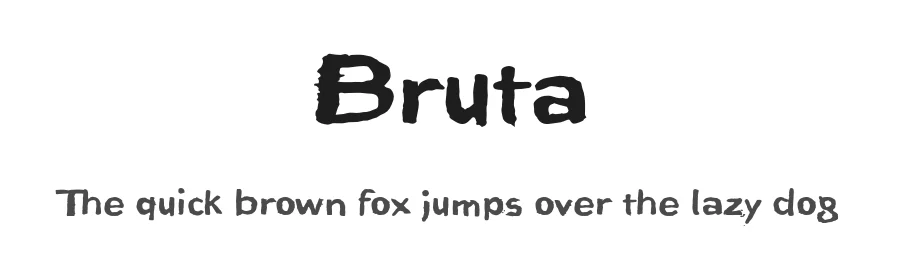
The German term for characters or letters is Buchstaben, literally Buche (beech) and Stab (rod or stick), and dates back to the Germanic custom of carving runic characters in beechwood sticks. On New Years Eve, 2014, I used the occasion to cut real beech characters myself. I carved all the characters of this font in woodcarving manner, without tracing and mirror-inverted, in smoothly planed beech rods. After printing on paper, the digital font you see here was created from the negative typeface.
Originally planning an alphabet of capital letters only, I ended up carving figures, punctuation marks and lower case letters after all. The capital letters emphasize alternation between bold and fine strokes, which is familiar in Roman typefaces. In this way, the upper case text in Bruta Woodcut obtains its very own aesthetics.
The ductus on the lower case letters is plainly not as distinct. They look more like a classical sans serif, which becomes clear as the smaller a text is set in Bruta Woodcut, the more legible it becomes.
The original image was negative. In contrast, the font consists of the positive typeface. Bruta Woodcut includes lots of ligatures and stylistic alternates for some symbols.
Thanks to OpenType and Unicode, Bruta Woodcut supports all Western European languages plus Central and Eastern European languages as well as Turkish.
Style & Use Cases
- Overall Style
- Bold, Distinctive, Fancy
- Use Case
- Headlines, Posters
- Ideal For
- logos, packaging, and standout titles
- Pairs With
- a neutral sans-serif
OpenType Features
Bruta ships with 2 OpenType features you can switch on in apps that support them (Illustrator, InDesign, Affinity, Figma, CSS font-feature-settings).
- Standard ligatures
- Stylistic alternates
How to Install Bruta Font
Step-by-step instructions for every platform
- 1Download the Bruta font file (.ttf or .otf).
- 2Locate the downloaded file in your Downloads folder.
- 3Right-click the font file.
- 4Select "Install" to install for the current user, or "Install for all users" to make it available system-wide.
- 5Bruta is now available in Word, Photoshop, Illustrator, and all other apps.
More by ingoFonts
View all →
Browse fonts by theme
Curated collections →Saw a font in a picture? Identify any font from an image with our free Font Finder.
More Decorative Fonts
Browse all →







What pairs well with Bruta Font?
Bruta Font is a decorative font that shines as a display or heading face. Pair it with a clean sans-serif or serif font for body text — the contrast creates a clear hierarchy while the two styles stay balanced and easy to read.




Premium Decorative Fonts
★ PremiumWant something with more weights, glyphs, and commercial polish? These premium decorative fonts are worth a look.
Bruta Font
by ingoFonts
Reviewed by the FontBoxDL team · Updated October 2026
License: 100% Free