
 1 / 8
1 / 8About Brushly 2.0 Font
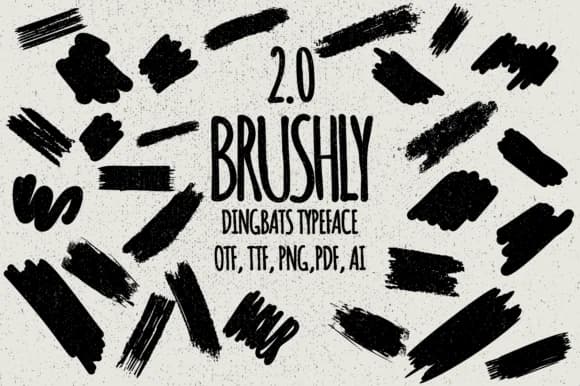
Brushly 2.0 by Minimalistartstudio is a dingbats typeface built entirely from 62 organic brush strokes and ink splashes. Unlike traditional fonts made of letters, each character in this collection functions as a discrete design element: textured marks, gestural lines, and splatter effects that feel authentically hand-painted and spontaneous. The set gives illustrators, designers, and artists quick access to expressive marks without having to hand-draw or source brushes separately from another tool.
This collection works beautifully for scrapbooking embellishments, watercolor art overlays, and hand-painted branding elements where you need authentic gestural texture. Layer these into tattoo design sketches, wedding stationery accents, or artistic label designs to add movement and spontaneous energy to your compositions. Journal and bullet journal decorators will find real value in having ready-made ink splashes and stroke effects at their fingertips. The vector-based construction means you can scale, colorize, and manipulate each mark freely across any design software without losing sharpness or quality.
If you're building work that reads as personal and hand-crafted, Brushly 2.0 is a smart solution that doesn't compromise on authenticity or character. Pick it up on Creative Fabrica and start layering these expressive marks into your next project.
Style & Use Cases
- Overall Style
- Iconographic, Brush
- Use Case
- Icons, Accents
- Ideal For
- ornaments, bullets, and decorative flourishes
- Pairs With
- any text font
How to Install Brushly 2.0 Font
Step-by-step instructions for every platform
- 1Download the Brushly 2.0 font file (.ttf or .otf).
- 2Locate the downloaded file in your Downloads folder.
- 3Right-click the font file.
- 4Select "Install" to install for the current user, or "Install for all users" to make it available system-wide.
- 5Brushly 2.0 is now available in Word, Photoshop, Illustrator, and all other apps.
More by Minimalistartstudio
View all →



Browse fonts by theme
Curated collections →Saw a font in a picture? Identify any font from an image with our free Font Finder.
More Dingbats Fonts
Browse all →







What pairs well with Brushly 2.0 Font?
Brushly 2.0 Font is a versatile dingbats font that works for both headings and body text. Pair it with a contrasting sans-serif or serif font to add visual interest and a clear distinction between titles and body copy.



Brushly 2.0 Font
Reviewed by the FontBoxDL team · Updated July 2026