
 1 / 8
1 / 8About Brushly Font
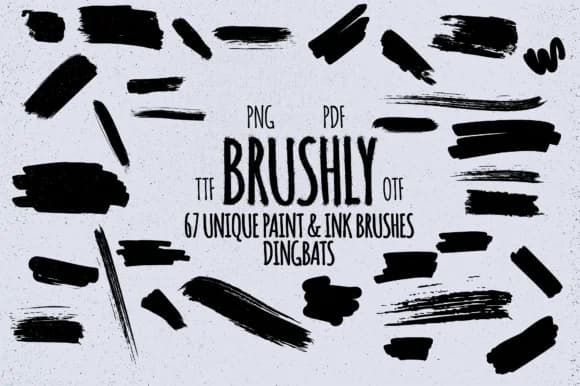
Picture yourself designing an invitation suite that needs genuine hand-painted character. Brushly, created by Minimalistartstudio, is a dingbats font that transforms typing into actual brush strokes, ink splatters, and watercolor marks. Each character you type produces a different painted element: oil brush gestures, splatter textures, grunge marks, and ink splashes that layer authentically across your canvas without requiring Photoshop's brush library.
This makes it ideal for wedding stationery that needs organic warmth, artist portfolio covers that showcase hand-painted aesthetics, album artwork requiring textured visual interest, and scrapbook layouts where real brushwork saves hours of manual illustration. The font packs multiple stroke styles accessible through letters, numbers, and punctuation marks, giving you dozens of variations without hunting through symbol libraries. What might take 30 minutes to hand-paint becomes instant when you're building a mood board or texture exploration document for a client presentation.
These marks read well at any scale: sharp on small book cover details, painterly when scaled for canvas prints or poster work. The glyph set is substantial, with enough variety that most projects won't exhaust what's available. Grab Brushly from Creative Fabrica to add authentic texture and painted energy to your next creative suite.
Style & Use Cases
- Overall Style
- Iconographic, Brush
- Use Case
- Icons, Accents
- Ideal For
- ornaments, bullets, and decorative flourishes
- Pairs With
- any text font
How to Install Brushly Font
Step-by-step instructions for every platform
- 1Download the Brushly font file (.ttf or .otf).
- 2Locate the downloaded file in your Downloads folder.
- 3Right-click the font file.
- 4Select "Install" to install for the current user, or "Install for all users" to make it available system-wide.
- 5Brushly is now available in Word, Photoshop, Illustrator, and all other apps.
More by Minimalistartstudio
View all →



Browse fonts by theme
Curated collections →Saw a font in a picture? Identify any font from an image with our free Font Finder.
More Dingbats Fonts
Browse all →







What pairs well with Brushly Font?
Brushly Font is a versatile dingbats font that works for both headings and body text. Pair it with a contrasting sans-serif or serif font to add visual interest and a clear distinction between titles and body copy.



Brushly Font
Reviewed by the FontBoxDL team · Updated July 2026