 Firefox
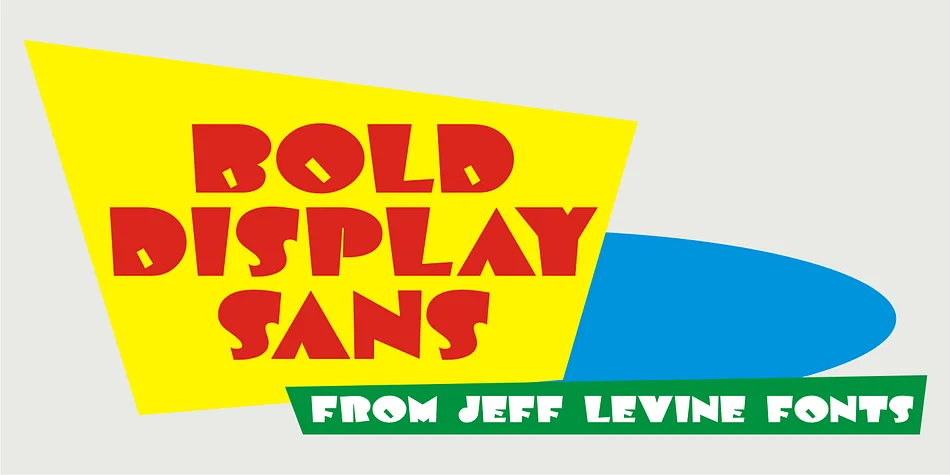
About BOLD DISPLAY SANS JNL Font
This typeface carries the bold, unpretentious energy of mid-century design. BOLD DISPLAY SANS JNL, created by Jeff Levine Fonts, traces its roots to a classic 1940s Speedball lettering alphabet. The original artwork featured intricate stippled textures and decorative inline curves scattered in seemingly random patterns throughout each character. This streamlined version strips away that ornamentation, committing fully to all-caps simplicity, making it perfect for situations where visual impact and genuine clarity matter far more than decoration.
The typeface works beautifully wherever retro appeal meets contemporary visual needs. Deploy it for vintage concert poster headers, craft brewery bottle label designs, bold diner menu titles, record store window signage, music venue marquee lettering, and boutique hotel promotional materials. The all-caps construction actually becomes a strength, building visual uniformity and presence that reads as intentional. Whether set large for a headline or used as a focal point, it commands attention with the straightforward visual confidence of mid-century letterpress work.
Pair BOLD DISPLAY SANS JNL with a clean, neutral sans-serif like Open Sans for body text to let this typeface shine as your visual anchor. Find it on Creative Fabrica and add this authentic piece of vintage typographic character to your font collection.
Style & Use Cases
- Overall Style
- Bold, Distinctive
- Use Case
- Headlines, Posters
- Ideal For
- logos, packaging, and standout titles
- Pairs With
- a neutral sans-serif
How to Install BOLD DISPLAY SANS JNL Font
Step-by-step instructions for every platform
- 1Download the BOLD DISPLAY SANS JNL font file (.ttf or .otf).
- 2Locate the downloaded file in your Downloads folder.
- 3Right-click the font file.
- 4Select "Install" to install for the current user, or "Install for all users" to make it available system-wide.
- 5BOLD DISPLAY SANS JNL is now available in Word, Photoshop, Illustrator, and all other apps.
More by Jeff Levine Fonts
View all →



Browse fonts by theme
Curated collections →Saw a font in a picture? Identify any font from an image with our free Font Finder.
More Decorative Fonts
Browse all →







What pairs well with BOLD DISPLAY SANS JNL Font?
BOLD DISPLAY SANS JNL Font is a decorative font that shines as a display or heading face. Pair it with a clean sans-serif or serif font for body text — the contrast creates a clear hierarchy while the two styles stay balanced and easy to read.




BOLD DISPLAY SANS JNL Font
Reviewed by the FontBoxDL team · Updated June 2026