 Firefox
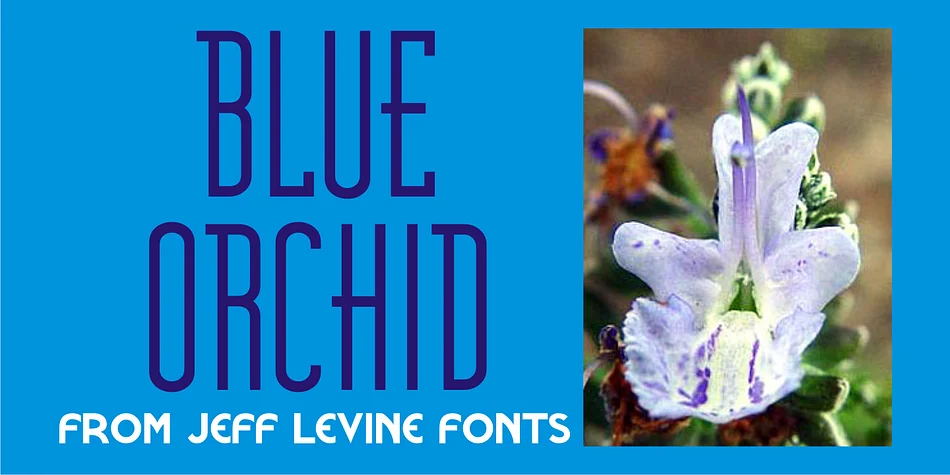
About BLUE ORCHID JNL Font
Imagine sitting down to design a vintage wedding invitation suite that captures authentic 1940s charm without feeling forced or pastiche. BLUE ORCHID JNL, from designer Jeff Levine Fonts, draws its character directly from hand-lettered sheet music, specifically the ornate title lettering from "Blue Orchids," a classic song of that era. This decorative typeface channels old Hollywood elegance in the way you'd recognize from a jazz age poster or vintage theater program, making it the natural choice for projects that demand genuine period authenticity.
The real strength here emerges in applications where retro credentials genuinely matter. Think retro cocktail bar menus with that nostalgic spirit intact, vinyl record cover designs that feel period-accurate, antique shop signage that tells a story, or vintage product labels for artisanal goods seeking that handmade aesthetic. The letterforms maintain clarity even with their ornamental flourishes, reading well at larger display sizes without becoming a liability for readability. Scrapbooking layouts, antique-inspired event branding, and DIY craft signage all benefit from this font's genuine character.
The best results emerge at larger sizes, where those 1940s flourishes really sing and the design shines. Get BLUE ORCHID JNL on Creative Fabrica and add that authentic vintage edge to your next project.
Style & Use Cases
- Overall Style
- Bold, Distinctive
- Use Case
- Headlines, Posters
- Ideal For
- logos, packaging, and standout titles
- Pairs With
- a neutral sans-serif
How to Install BLUE ORCHID JNL Font
Step-by-step instructions for every platform
- 1Download the BLUE ORCHID JNL font file (.ttf or .otf).
- 2Locate the downloaded file in your Downloads folder.
- 3Right-click the font file.
- 4Select "Install" to install for the current user, or "Install for all users" to make it available system-wide.
- 5BLUE ORCHID JNL is now available in Word, Photoshop, Illustrator, and all other apps.
More by Jeff Levine Fonts
View all →



Browse fonts by theme
Curated collections →Saw a font in a picture? Identify any font from an image with our free Font Finder.
More Decorative Fonts
Browse all →







What pairs well with BLUE ORCHID JNL Font?
BLUE ORCHID JNL Font is a decorative font that shines as a display or heading face. Pair it with a clean sans-serif or serif font for body text — the contrast creates a clear hierarchy while the two styles stay balanced and easy to read.




BLUE ORCHID JNL Font
Reviewed by the FontBoxDL team · Updated June 2026