
 1 / 4
1 / 4About Blossomie Font
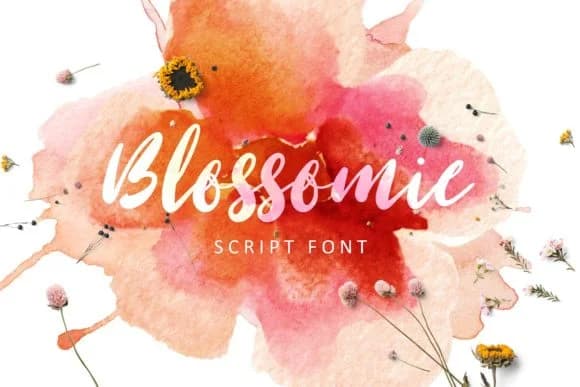
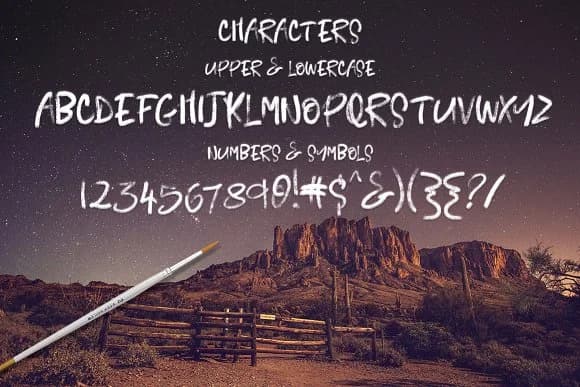
This font brings a warm, hand-drawn sensibility that feels lived-in and genuine. Blossomie Font, created by Creativeqube Design, is a brush script that balances organic, gestural marks with consistent letterforms that perform well across sizes.
The flowing, painterly stroke quality suits wedding invitation suites, luxury skincare and cosmetics packaging, boutique stationery collections, and hand-lettered product labels you'd find at craft markets or small-batch sellers. Each letter carries the character of a real brush applied to paper, creating an artisan quality that feels authentic whether you're using it for headlines or secondary text. Most script fonts make you choose between personality and readability, but Blossomie keeps both without compromise. The glyph set is comprehensive and clean, so you can confidently treat this as a primary typeface rather than just an accent font.
The real versatility comes through when you work with it across different scales and contexts. On a wine label or a canvas tote, the brushwork holds its character and doesn't fall apart. Pair it with a minimal geometric sans-serif like Inter or Montserrat to create contrast and keep body text accessible. Find Blossomie on Creative Fabrica, where a subscription gives you unlimited access to this font and thousands more for your projects.
Style & Use Cases
- Overall Style
- Elegant, Flowing, Blossomie
- Use Case
- Invitations, Branding
- Ideal For
- wedding stationery, greeting cards, and signatures
- Pairs With
- a simple uppercase sans
How to Install Blossomie Font Font
Step-by-step instructions for every platform
- 1Download the Blossomie Font font file (.ttf or .otf).
- 2Locate the downloaded file in your Downloads folder.
- 3Right-click the font file.
- 4Select "Install" to install for the current user, or "Install for all users" to make it available system-wide.
- 5Blossomie Font is now available in Word, Photoshop, Illustrator, and all other apps.
More by Creativeqube Design
View all →
More Script Handwritten Fonts
Browse all →







What pairs well with Blossomie Font?
Blossomie Font is a script font that shines as a display or heading face. Pair it with a clean sans-serif or serif font for body text — the contrast creates a clear hierarchy while the two styles stay balanced and easy to read.



Blossomie Font
Reviewed by the FontBoxDL team · Updated June 2026