
 1 / 8
1 / 8About Bloom Font
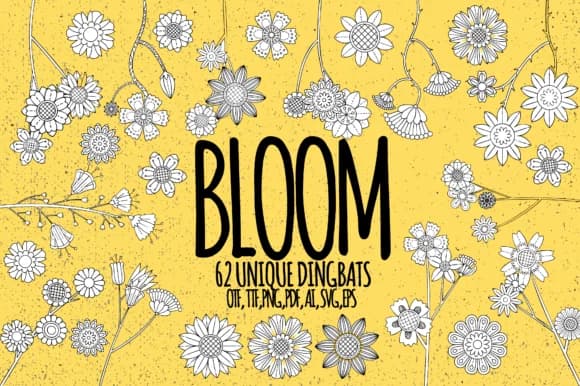
There's something naturally graceful about hand-drawn florals. Bloom, designed by Minimalistartstudio, is a dingbats font built to do one thing beautifully: give you instant access to floral and botanical line art without the time spent illustrating it yourself. Type a capital letter, lowercase letter, or number and you get one of 62 different doodles, each with its own character. It's straightforward and practical in the best way.
The collection has real range, which makes this work well across multiple project types. Wedding invitation suites benefit from coordinated floral details that feel intentional rather than clip-art. Etsy product labels and small-business packaging gain that hand-drawn quality buyers trust. Plant-themed journal spreads and bullet journal layouts come together faster with custom elements. DIY greeting cards and stickers feel more personal when you can mix and match from a cohesive library. Each dingbat is a small line illustration you can layer, repeat, or resize to fit your layout. Because these are vector dingbats, they scale cleanly at any size without losing detail or becoming pixelated.
Pair Bloom with a clean sans-serif like Sofia Pro or Poppins to ground the florals in readable body text and prevent visual chaos. Grab it on Creative Fabrica and start building designs that feel both considered and organic.
Style & Use Cases
- Overall Style
- Iconographic, Bloom
- Use Case
- Icons, Accents
- Ideal For
- ornaments, bullets, and decorative flourishes
- Pairs With
- any text font
How to Install Bloom Font
Step-by-step instructions for every platform
- 1Download the Bloom font file (.ttf or .otf).
- 2Locate the downloaded file in your Downloads folder.
- 3Right-click the font file.
- 4Select "Install" to install for the current user, or "Install for all users" to make it available system-wide.
- 5Bloom is now available in Word, Photoshop, Illustrator, and all other apps.
More by Minimalistartstudio
View all →



Browse fonts by theme
Curated collections →Saw a font in a picture? Identify any font from an image with our free Font Finder.
More Dingbats Fonts
Browse all →







What pairs well with Bloom Font?
Bloom Font is a versatile dingbats font that works for both headings and body text. Pair it with a contrasting sans-serif or serif font to add visual interest and a clear distinction between titles and body copy.



Bloom Font
Reviewed by the FontBoxDL team · Updated July 2026