
 1 / 7
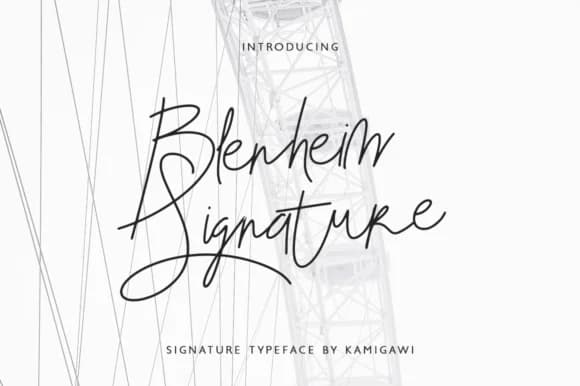
1 / 7About Blenheim Signature Font
Blenheim Signature by kamigawi.etc is a refined, flowing script font that brings understated elegance to contemporary and traditional design projects alike. With its balanced letterforms and signature-style flourishes, this typeface works beautifully across personal stationery sets, luxury brand packaging, and custom monogram designs where authenticity and refined character matter most. The font's minimal aesthetic makes it equally effective on high-end business cards, wedding invitation suites, and boutique product labels seeking a distinctive, handcrafted touch without sacrificing sophistication. Whether you're designing refined logotypes for established brands, crafting individualized correspondence, or developing comprehensive brand identity systems, Blenheim Signature delivers the polish that distinguishes professional work from generic alternatives. Its clean lines and flowing character spacing ensure reliable legibility while maintaining that personal, organic quality designers seek, ideal for those working within minimalist aesthetics or anyone looking to add refined character to premium product packaging, luxury stationery collections, and professionally branded materials. The signature-forward design makes it particularly suitable for creative professionals who value subtlety over flash. Its versatility across both digital and print mediums opens possibilities for designers tackling everything from branded social media graphics to physical packaging. Grab Blenheim Signature from Creative Fabrica and bring sophisticated handwritten elegance to your next design.
How to Install Blenheim Signature Font Font
Step-by-step instructions for every platform
- 1Download the Blenheim Signature Font font file (.ttf or .otf).
- 2Locate the downloaded file in your Downloads folder.
- 3Right-click the font file.
- 4Select "Install" to install for the current user, or "Install for all users" to make it available system-wide.
- 5Blenheim Signature Font is now available in Word, Photoshop, Illustrator, and all other apps.
More by kamigawi.etc
View all →
More Script Handwritten Fonts
Browse all →







What pairs well with Blenheim Signature Font?
Blenheim Signature Font is a script font that shines as a display or heading face. Pair it with a clean sans-serif or serif font for body text — the contrast creates a clear hierarchy while the two styles stay balanced and easy to read.


Blenheim Signature Font
by kamigawi.etc
Reviewed by the FontBoxDL team · Updated May 2026