 Firefox
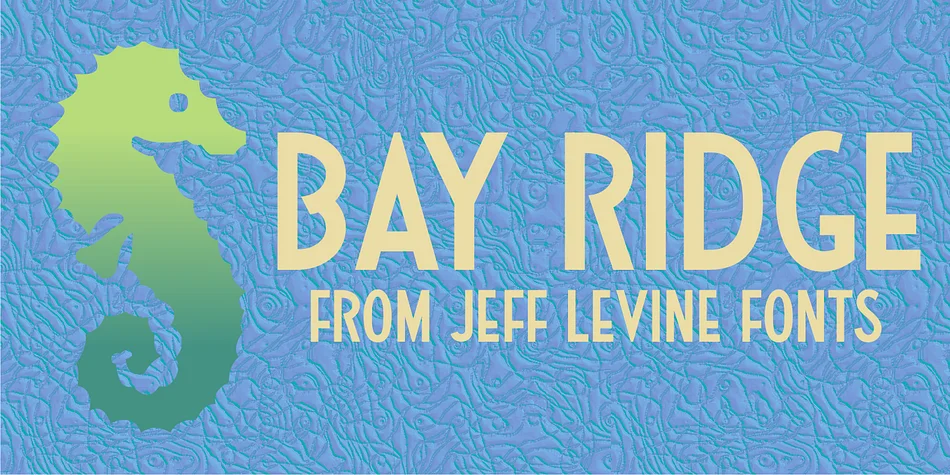
About BAY RIDGE JNL Font
Bay Ridge JNL, designed by Jeff Levine, captures the character of classic sheet music lettering. The letterforms display that distinctive mid-century bounce you'd find on old songsheet covers, paired with friendly curves and a nostalgic rhythm that feels refined without pretension or unnecessary fussiness.
This decorative typeface excels for projects calling for authentic retro character rather than heavy-handed or ironic nostalgia. Vintage concert posters benefit tremendously from its strong proportions; wedding invitation suites read genuinely elegant with 1940s-50s sensibility; hand-lettered album artwork for indie record labels comes beautifully alive; craft signage echoing hand-painted shop fronts feels period-authentic and convincing. The weight sits comfortably between playful and sophisticated, never veering too far in either direction. Designers reach for it when creating speakeasy and jazz club branding, confectionery packaging with vintage roots, retro editorial spreads, and eye-catching signage for antique shops or bookstores. Each application benefits from Bay Ridge's genuine period style and restraint without trying too hard. It reads authentically mid-century, grounded in real vintage character rather than pastiche.
This typeface suits designers and brands who want real depth in their vintage identity work. You'll find it on Creative Fabrica, where it anchors a complete design system with that genuine retro aesthetic.
Style & Use Cases
- Overall Style
- Bold, Distinctive
- Use Case
- Headlines, Posters
- Ideal For
- logos, packaging, and standout titles
- Pairs With
- a neutral sans-serif
How to Install BAY RIDGE JNL Font
Step-by-step instructions for every platform
- 1Download the BAY RIDGE JNL font file (.ttf or .otf).
- 2Locate the downloaded file in your Downloads folder.
- 3Right-click the font file.
- 4Select "Install" to install for the current user, or "Install for all users" to make it available system-wide.
- 5BAY RIDGE JNL is now available in Word, Photoshop, Illustrator, and all other apps.
More by Jeff Levine Fonts
View all →



Browse fonts by theme
Curated collections →Saw a font in a picture? Identify any font from an image with our free Font Finder.
More Decorative Fonts
Browse all →







What pairs well with BAY RIDGE JNL Font?
BAY RIDGE JNL Font is a decorative font that shines as a display or heading face. Pair it with a clean sans-serif or serif font for body text — the contrast creates a clear hierarchy while the two styles stay balanced and easy to read.




BAY RIDGE JNL Font
Reviewed by the FontBoxDL team · Updated June 2026