 Firefox
 1 / 4
1 / 4About Banners Font
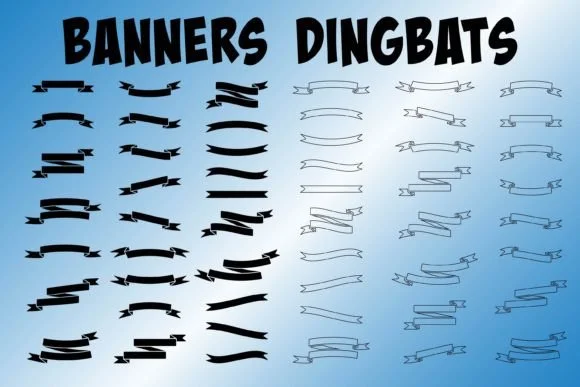
Banners by Paper Daisy Graphics is a versatile dingbat collection designed for decorative impact and visual warmth in hand-drawn design work. Type lowercase characters to access solid banner shapes and uppercase characters to reveal outlined versions, giving you two distinct design directions from a single font file. This dual approach works beautifully for hand-lettered greeting cards, wedding invitation suites, custom label designs, boutique product packaging, and scrapbooking layouts where ornamental detail truly carries real visual presence and personality.
SVG, EPS, DXF, and PNG bonus asset files are all included with the collection, ensuring compatibility across your favorite design software and production workflows. You'll use these versatile shapes for virtually everything from vintage-style craft signage to tags marking handmade goods to branded stationery systems that need a polished finishing touch. Outlined variants accept color fills and texture underlays, while solid versions work wonderfully as standalone embellishments or pair beautifully with hand-lettering for layered typography effects that feel organic and intentional. Once you start designing with them, you'll find yourself reaching back to these shapes repeatedly, constantly discovering new applications and unexpected combinations across every project.
Get Banners from Creative Fabrica and start adding these dimensional ornaments to all your design work.
Style & Use Cases
- Overall Style
- Iconographic, Banner
- Use Case
- Icons, Accents
- Ideal For
- ornaments, bullets, and decorative flourishes
- Pairs With
- any text font
How to Install Banners Font
Step-by-step instructions for every platform
- 1Download the Banners font file (.ttf or .otf).
- 2Locate the downloaded file in your Downloads folder.
- 3Right-click the font file.
- 4Select "Install" to install for the current user, or "Install for all users" to make it available system-wide.
- 5Banners is now available in Word, Photoshop, Illustrator, and all other apps.
Browse fonts by theme
Curated collections →Saw a font in a picture? Identify any font from an image with our free Font Finder.
More Dingbats Fonts
Browse all →







What pairs well with Banners Font?
Banners Font is a versatile dingbats font that works for both headings and body text. Pair it with a contrasting sans-serif or serif font to add visual interest and a clear distinction between titles and body copy.




Banners Font
Reviewed by the FontBoxDL team · Updated July 2026