 Firefox
 1 / 8
1 / 8About Bakery Font
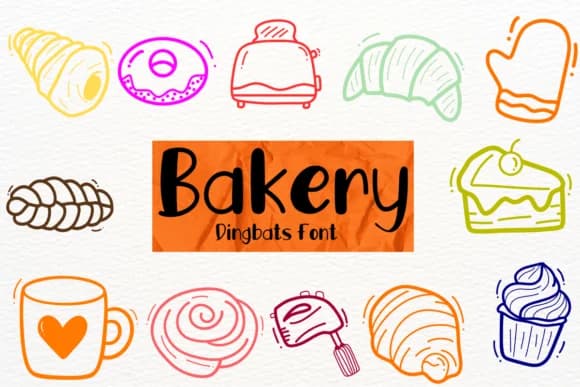
Bakery, designed by Petal Pixels, brings together ornamental characters with a genuine handwritten sensibility, blending playful flourishes with refined detail. The letterforms sit somewhere between decorative symbols and expressive handwriting, creating a distinctive personality that sets it apart from standard dingbat collections.
This font excels for bullet journal spreads where you want decorative separators and doodle-like elements, digital planner layouts in Goodnotes or Procreate where handwritten touches feel natural, and wedding invitation suites that benefit from organic, craft-inspired flourishes. You can layer multiple glyphs across a single project to build visual interest without the design feeling overwrought. It works equally well for DIY greeting card designs, Etsy product packaging labels with a homemade aesthetic, or planning pages that need character and personality. The range of included ornaments means you have options for nearly any decorative need.
This font is built for creatives who want genuine hand-drawn appeal but need consistent, production-ready elements without learning illustration. The balanced design keeps it from feeling cluttered or overly precious, even when you combine multiple elements. It's ideal for anyone creating work that celebrates the warmth of handmade aesthetics. Find Bakery on Creative Fabrica and bring that authentic, crafted feeling to your projects.
Style & Use Cases
- Overall Style
- Iconographic, Note Taking Fonts
- Use Case
- Icons, Accents
- Ideal For
- ornaments, bullets, and decorative flourishes
- Pairs With
- any text font
How to Install Bakery Font
Step-by-step instructions for every platform
- 1Download the Bakery font file (.ttf or .otf).
- 2Locate the downloaded file in your Downloads folder.
- 3Right-click the font file.
- 4Select "Install" to install for the current user, or "Install for all users" to make it available system-wide.
- 5Bakery is now available in Word, Photoshop, Illustrator, and all other apps.
More by Petal Pixels
View all →
Browse fonts by theme
Curated collections →Saw a font in a picture? Identify any font from an image with our free Font Finder.
More Dingbats Fonts
Browse all →







What pairs well with Bakery Font?
Bakery Font is a versatile dingbats font that works for both headings and body text. Pair it with a contrasting sans-serif or serif font to add visual interest and a clear distinction between titles and body copy.



Bakery Font
by Petal Pixels
Reviewed by the FontBoxDL team · Updated July 2026