
 1 / 6
1 / 6About Asturo Ribbon Font
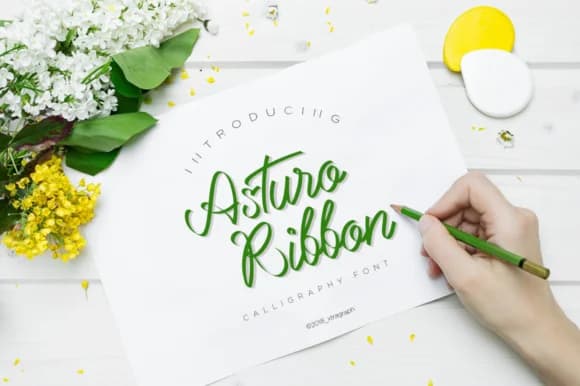
Asturo Ribbon Font by soloart61 is an elegant, flowing script typeface that transforms creative design projects with beautiful ribbon-like letterforms and a distinctive sophisticated character. This graceful, refined font excels in creating luxury wedding stationery suites, curated fashion editorials, and personalized brand signatures that demand distinctly refined visual expression. Beyond these traditional applications, Asturo Ribbon adapts beautifully to artisanal product packaging, upscale event menus, custom certificate designs, and decorative hand-lettered signage where flowing aesthetics enhance the overall visual impact. Photographers benefit from its smooth, expressive strokes for elegant watermark signatures and artistic photo overlays, while creative businesses building premium brand identities appreciate its versatility across both digital and print mediums.
The font's connected, ribbon-style letterforms create a distinctly sophisticated aesthetic that stands out in any competitive marketplace. Its smooth character spacing and fluid movement work beautifully whether you're designing bespoke stationery for luxury brands, crafting high-end packaging labels, or developing unique signature elements for premium branding initiatives. The typeface speaks directly to discerning audiences who value genuine craftsmanship and refined design, making it the ideal choice for ambitious creative projects where visual sophistication and personal touches matter most to your unique brand story.
Get Asturo Ribbon Font on Creative Fabrica.
How to Install Asturo Ribbon Font Font
Step-by-step instructions for every platform
- 1Download the Asturo Ribbon Font font file (.ttf or .otf).
- 2Locate the downloaded file in your Downloads folder.
- 3Right-click the font file.
- 4Select "Install" to install for the current user, or "Install for all users" to make it available system-wide.
- 5Asturo Ribbon Font is now available in Word, Photoshop, Illustrator, and all other apps.
More by soloart61
View all →
More Script Handwritten Fonts
Browse all →







What pairs well with Asturo Ribbon Font?
Asturo Ribbon Font is a script font that shines as a display or heading face. Pair it with a clean sans-serif or serif font for body text — the contrast creates a clear hierarchy while the two styles stay balanced and easy to read.


