 Firefox
 1 / 2
1 / 2About ASBURY PARK JNL Font
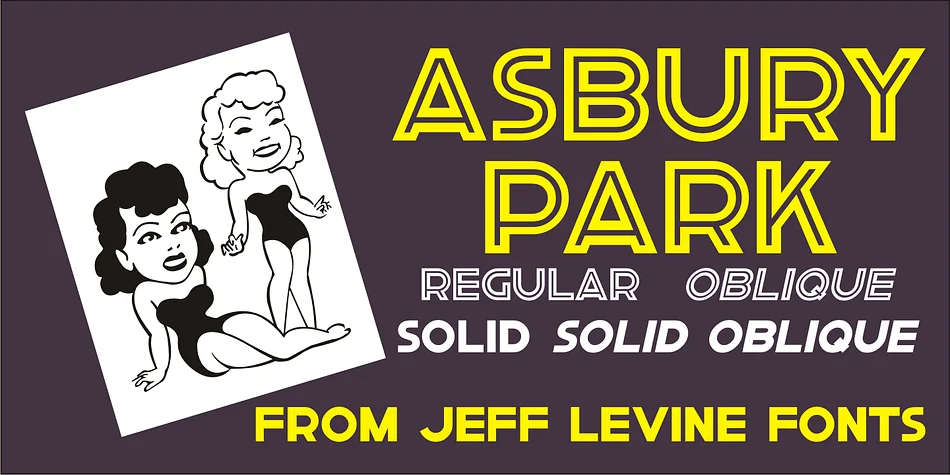
The clean, geometric strokes of this inline sans serif carry the bold spirit of 1930s American poster design, where every element earned its place on the page. Created by Jeff Levine Fonts, Asbury Park JNL draws from a hand-lettered "Work with Care" poster that emerged during Pennsylvania's WPA Federal art projects, translating Depression-era visual language into a typeface with real presence and distinctive character.
The inline letterforms create an engaging contrast between solid and open space, making this font ideal for retro concert posters, vintage diner menu headers, speakeasy branding, and art deco-influenced packaging designs. Antique shop signage, indie record labels, and boutique vintage brands all find what they need here for projects demanding that 1930s aesthetic without forced sentiment. The typeface performs equally well at display sizes and smaller headlines, giving you flexibility across campaigns that lean into Depression-era visual culture or mid-century American design.
This one works best if you're building work rooted in historical design movements or simply need letterforms that speak to classic Americana. Get Asbury Park JNL on Creative Fabrica and bring that authoritative poster style to your next project.
Style & Use Cases
- Overall Style
- Bold, Distinctive
- Use Case
- Headlines, Posters
- Ideal For
- logos, packaging, and standout titles
- Pairs With
- a neutral sans-serif
How to Install ASBURY PARK JNL Font
Step-by-step instructions for every platform
- 1Download the ASBURY PARK JNL font file (.ttf or .otf).
- 2Locate the downloaded file in your Downloads folder.
- 3Right-click the font file.
- 4Select "Install" to install for the current user, or "Install for all users" to make it available system-wide.
- 5ASBURY PARK JNL is now available in Word, Photoshop, Illustrator, and all other apps.
More by Jeff Levine Fonts
View all →



Browse fonts by theme
Curated collections →Saw a font in a picture? Identify any font from an image with our free Font Finder.
More Decorative Fonts
Browse all →







What pairs well with ASBURY PARK JNL Font?
ASBURY PARK JNL Font is a decorative font that shines as a display or heading face. Pair it with a clean sans-serif or serif font for body text — the contrast creates a clear hierarchy while the two styles stay balanced and easy to read.




ASBURY PARK JNL Font
Reviewed by the FontBoxDL team · Updated June 2026