 Firefox
 1 / 5
1 / 5About Artistic Deco JNL Font
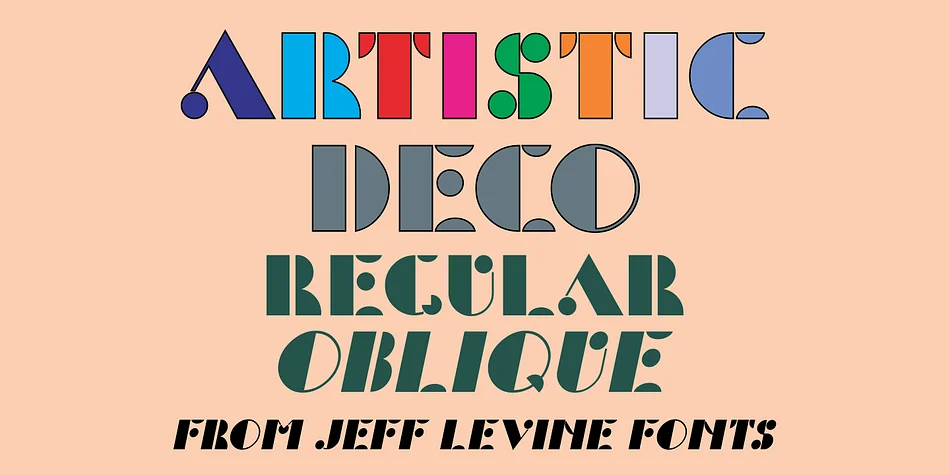
This typeface carries that bold, geometric sophistication of the Art Deco era. Artistic Deco JNL, designed by Jeff Levine Fonts, builds on the architectural strength of classic Futura Black but pushes it further by weaving curves and rounded elements throughout the letterforms, creating visual rhythm without losing impact.
What sets this font apart is how those geometric curves interact with the heavy weights, creating a personality that's both refined and lively. The circles and arcs catch the eye and give the letters an unexpected warmth, even though the overall structure remains authoritative and commanding. It's decorative enough to grab instant attention but still grounded enough to read clearly when you need it to. The geometric approach makes it perfect for projects that demand vintage glamour. Picture 1920s-inspired wedding invitations and save-the-dates, speakeasy bar menus and cocktail lists, luxury fragrance or skincare packaging, and retro event posters that need instant period authenticity. You get both regular and oblique weights, so you can layer them together for contrast or use the oblique alone for a more dynamic tilt.
Pair it with a clean, minimal sans-serif for body text to let Artistic Deco JNL's personality shine without overwhelm. Get it from Creative Fabrica and add some geometric elegance to your next design project.
Style & Use Cases
- Overall Style
- Bold, Distinctive
- Use Case
- Headlines, Posters
- Ideal For
- logos, packaging, and standout titles
- Pairs With
- a neutral sans-serif
How to Install Artistic Deco JNL Font
Step-by-step instructions for every platform
- 1Download the Artistic Deco JNL font file (.ttf or .otf).
- 2Locate the downloaded file in your Downloads folder.
- 3Right-click the font file.
- 4Select "Install" to install for the current user, or "Install for all users" to make it available system-wide.
- 5Artistic Deco JNL is now available in Word, Photoshop, Illustrator, and all other apps.
More by Jeff Levine Fonts
View all →



Browse fonts by theme
Curated collections →Saw a font in a picture? Identify any font from an image with our free Font Finder.
More Decorative Fonts
Browse all →







What pairs well with Artistic Deco JNL Font?
Artistic Deco JNL Font is a decorative font that shines as a display or heading face. Pair it with a clean sans-serif or serif font for body text — the contrast creates a clear hierarchy while the two styles stay balanced and easy to read.




Artistic Deco JNL Font
Reviewed by the FontBoxDL team · Updated June 2026