 Firefox
About ART TOPIC JNL Font
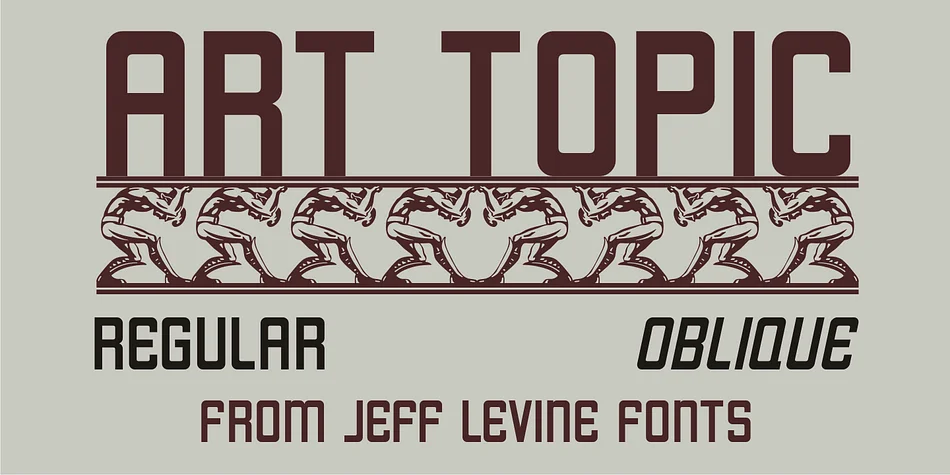
Soft corners paired with sturdy geometric letterforms create an instantly recognizable retro aesthetic. ART TOPIC JNL, designed by Jeff Levine Fonts, sources its distinctive character directly from the visual vocabulary of 1930s American design culture. The typeface was inspired by an authentic Works Progress Administration poster from the Federal Arts Project, capturing that exact moment when Art Deco modernism intersected with public-spirited American graphic design.
What makes this typeface valuable is that it captures genuine historical character rather than just referencing the era superficially. The rounded square proportions feel both contemporary and authentically vintage, which opens up considerable creative territory for designers. You can use it for speakeasy and jazz club menu design, vintage event invitations and concert posters, retro diner signage, nostalgic product packaging and labels, or Art Deco wedding stationery. Book cover design with historical themes, antique shop branding, or any project anchored in mid-century American vernacular will benefit from its visual authenticity.
This typeface suits designers tackling vintage-themed client work, period-accurate historical materials, or brand identity projects that channel pre-war American graphic culture. The geometric-but-approachable forms work across contexts, from formal design applications to casual DIY projects. Find ART TOPIC JNL on Creative Fabrica and bring authentic 1930s sensibility to your next design.
Style & Use Cases
- Overall Style
- Bold, Distinctive
- Use Case
- Headlines, Posters
- Ideal For
- logos, packaging, and standout titles
- Pairs With
- a neutral sans-serif
How to Install ART TOPIC JNL Font
Step-by-step instructions for every platform
- 1Download the ART TOPIC JNL font file (.ttf or .otf).
- 2Locate the downloaded file in your Downloads folder.
- 3Right-click the font file.
- 4Select "Install" to install for the current user, or "Install for all users" to make it available system-wide.
- 5ART TOPIC JNL is now available in Word, Photoshop, Illustrator, and all other apps.
More by Jeff Levine Fonts
View all →



Browse fonts by theme
Curated collections →Saw a font in a picture? Identify any font from an image with our free Font Finder.
More Decorative Fonts
Browse all →







What pairs well with ART TOPIC JNL Font?
ART TOPIC JNL Font is a decorative font that shines as a display or heading face. Pair it with a clean sans-serif or serif font for body text — the contrast creates a clear hierarchy while the two styles stay balanced and easy to read.




ART TOPIC JNL Font
Reviewed by the FontBoxDL team · Updated June 2026