 Firefox
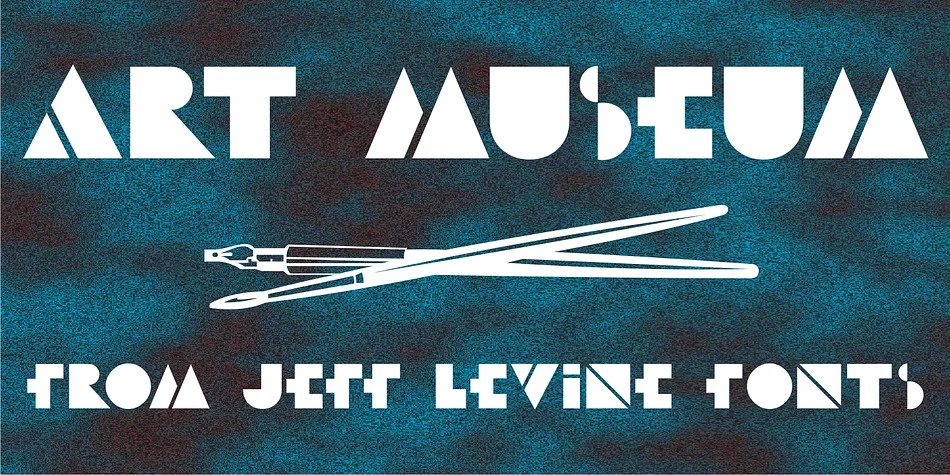
About ART MUSEUM JNL Font
ART MUSEUM JNL by Jeff Levine Fonts captures the commanding geometric boldness that defines Art Deco, drawing directly from authentic historical sources. The design was sourced from WPA poster archives, specifically from vintage promotional materials for America's national parks and winter sports campaigns that date to the 1930s. A key visual detail is the inverted middle crossbar on the letters E and F, a hand-rendered characteristic pulled straight from the original poster's lettering. This single unexpected element breaks up the geometric perfection just enough to lend the typeface unexpected warmth and human character while preserving its bold authority.
You'll reach for this typeface when designing vintage travel poster compositions, upscale speakeasy bar signage, classic theater marquee lettering, and formal art gallery event announcements. The typeface carries substantial visual weight that commands real attention at display sizes yet remains readable even at moderate text scale. Period accurate branding work finds a perfect partner in this typeface. Recreate 1930s aesthetics for contemporary luxury product packaging, build retro themed event materials for brands with visual heritage, or use it as a headline face with genuine historical grounding rather than manufactured nostalgia. The design language feels authentic to its era without veering into kitsch or pastiche.
Get ART MUSEUM JNL from Creative Fabrica to add authentic period character to your design toolkit and start bringing genuine Art Deco presence to your next project.
Style & Use Cases
- Overall Style
- Bold, Distinctive
- Use Case
- Headlines, Posters
- Ideal For
- logos, packaging, and standout titles
- Pairs With
- a neutral sans-serif
How to Install ART MUSEUM JNL Font
Step-by-step instructions for every platform
- 1Download the ART MUSEUM JNL font file (.ttf or .otf).
- 2Locate the downloaded file in your Downloads folder.
- 3Right-click the font file.
- 4Select "Install" to install for the current user, or "Install for all users" to make it available system-wide.
- 5ART MUSEUM JNL is now available in Word, Photoshop, Illustrator, and all other apps.
More by Jeff Levine Fonts
View all →



Browse fonts by theme
Curated collections →Saw a font in a picture? Identify any font from an image with our free Font Finder.
More Decorative Fonts
Browse all →







What pairs well with ART MUSEUM JNL Font?
ART MUSEUM JNL Font is a decorative font that shines as a display or heading face. Pair it with a clean sans-serif or serif font for body text — the contrast creates a clear hierarchy while the two styles stay balanced and easy to read.




ART MUSEUM JNL Font
Reviewed by the FontBoxDL team · Updated June 2026