 Firefox
 1 / 8
1 / 8About Arrow Font
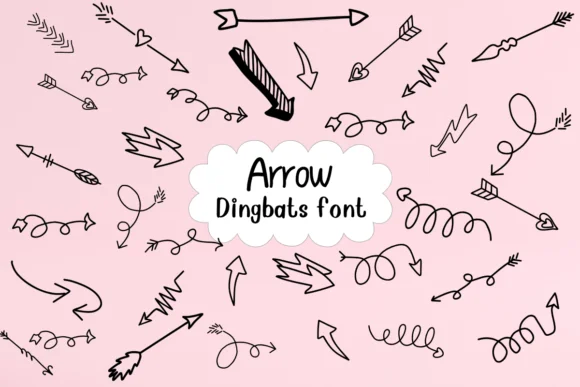
Arrow, designed by Nongyao, brings a sketchy, hand-drawn energy to the dingbats category. These aren't your ordinary direction markers: each arrow carries playful personality, rendered with loose brushstrokes and organic curves that feel more like doodle art than technical symbols. What sets this font apart is how it captures that felt-tip pen immediacy you'd recognize from a sketchbook, giving designers a tool that feels more human and less sterile.
The font opens up possibilities across multiple project types. Teachers can use Arrow for educational worksheets where traditional symbols feel too rigid, bringing warmth to classroom materials. DIY craft enthusiasts will find it fits naturally into activity book illustrations and coloring page designs that need personality. Event organizers can apply the playful style to wayfinding signage, while content creators might weave these arrows into comic strips or illustrated tutorials. Greeting card designers benefit from the font's approachable personality that reads less manufactured and more genuine.
Available in both OTF and TTF formats, Arrow works with your existing design toolkit across all major platforms and applications. This font is best suited for projects targeting younger audiences or anyone seeking a softer alternative to clinical design systems; find it on Creative Fabrica.
Style & Use Cases
- Overall Style
- Iconographic, Fonts
- Use Case
- Icons, Accents
- Ideal For
- ornaments, bullets, and decorative flourishes
- Pairs With
- any text font
How to Install Arrow Font
Step-by-step instructions for every platform
- 1Download the Arrow font file (.ttf or .otf).
- 2Locate the downloaded file in your Downloads folder.
- 3Right-click the font file.
- 4Select "Install" to install for the current user, or "Install for all users" to make it available system-wide.
- 5Arrow is now available in Word, Photoshop, Illustrator, and all other apps.




Browse fonts by theme
Curated collections →Saw a font in a picture? Identify any font from an image with our free Font Finder.
More Dingbats Fonts
Browse all →







What pairs well with Arrow Font?
Arrow Font is a versatile dingbats font that works for both headings and body text. Pair it with a contrasting sans-serif or serif font to add visual interest and a clear distinction between titles and body copy.




Arrow Font
by Nongyao
Reviewed by the FontBoxDL team · Updated July 2026