 Firefox
 1 / 5
1 / 5About APPAREL JNL Font
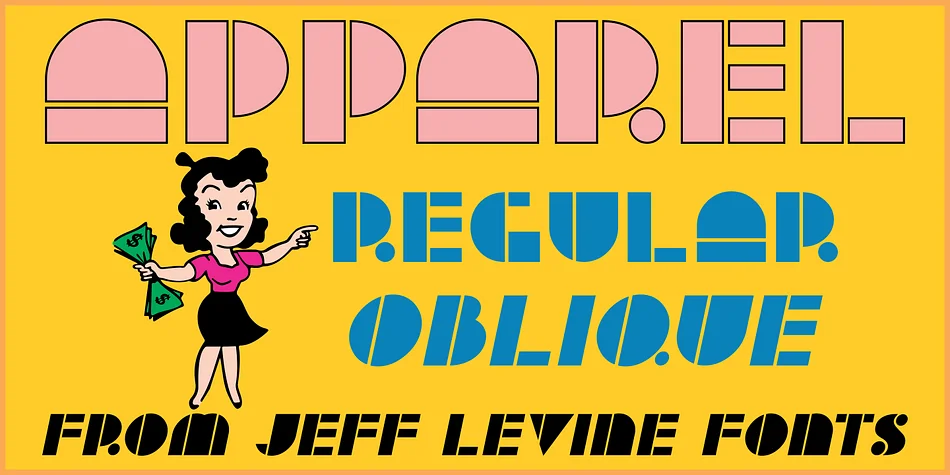
The stencil-cut letterforms of APPAREL JNL carry the bold graphic punch of 1930s commercial design. Created by Jeff Levine Fonts, this typeface traces its origin to hand-lettered storefront signage for a women's fashion shop, preserved in a 1939 design archive. The blocky geometry and Art Deco sensibility feel both nostalgic and visually sharp, with strong verticals and open counters that read as signage rather than text. That same visual language, once painted on a storefront window, now carries all its original theatrical energy in digital form.
The font excels for vintage cosmetics labels, speakeasy and craft bar signage, high-end boutique fashion branding, and art deco wedding invitation suites. Available in both regular and oblique versions, you have the flexibility to add emphasis or tilt toward drama without compromising the font's core character. The weight holds strong in large display sizes, and it retains enough legibility at smaller scales for both print and digital applications. If you're building a brand or campaign around an authentic 1930s commercial aesthetic, this typeface will deliver exactly that look. Find APPAREL JNL on Creative Fabrica.
Style & Use Cases
- Overall Style
- Bold, Distinctive
- Use Case
- Headlines, Posters
- Ideal For
- logos, packaging, and standout titles
- Pairs With
- a neutral sans-serif
How to Install APPAREL JNL Font
Step-by-step instructions for every platform
- 1Download the APPAREL JNL font file (.ttf or .otf).
- 2Locate the downloaded file in your Downloads folder.
- 3Right-click the font file.
- 4Select "Install" to install for the current user, or "Install for all users" to make it available system-wide.
- 5APPAREL JNL is now available in Word, Photoshop, Illustrator, and all other apps.
More by Jeff Levine Fonts
View all →



Browse fonts by theme
Curated collections →Saw a font in a picture? Identify any font from an image with our free Font Finder.
More Decorative Fonts
Browse all →







What pairs well with APPAREL JNL Font?
APPAREL JNL Font is a decorative font that shines as a display or heading face. Pair it with a clean sans-serif or serif font for body text — the contrast creates a clear hierarchy while the two styles stay balanced and easy to read.




APPAREL JNL Font
Reviewed by the FontBoxDL team · Updated June 2026