 Firefox
 1 / 10
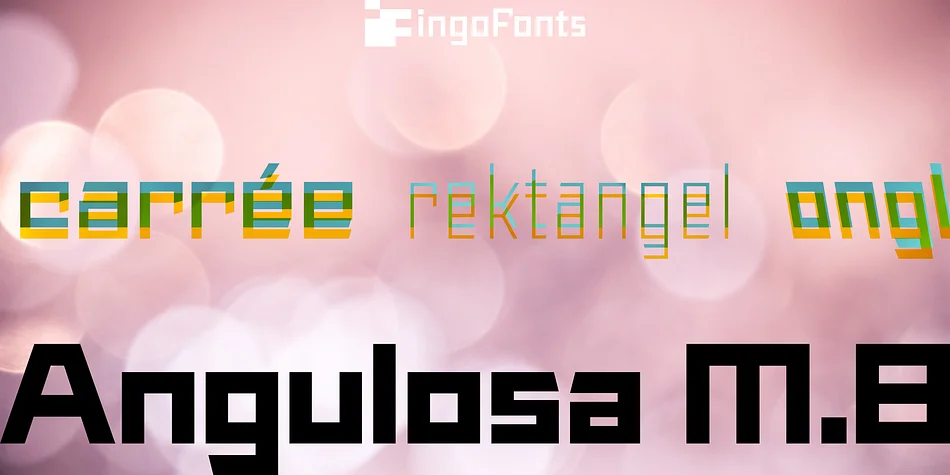
About Angulosa M.8 Font
At first glance, »Angulosa M.8« is one of those fonts that a technician or engineer would probably draw. And yet it differs fundamentally from typefaces constructed in this way.
The right angle forms the basic element of the »Angulosa M.8«, but that’s about it with the pure mathematics. Serif-like upstrokes and downstrokes on some letters improve readability, and carefully used slants makes the appearance a little friendlier. The proportions are not based on any mathematical principle, but are derived from freehand writing of the letterforms with a broad quill.
In terms of style, »Angulosa M.8« belongs most closely to the modernist, constructivist typeface attempts, such as those made at the Bauhaus in the 1930s.
The styles of »Angulosa M.8« range from “Condensed” to “Expanded”, from “Light” to “Black”, plus the respective oblique form, which in this font is slanted to the left.
All variants can be adjusted continuously in the variable font: the font width ranges from 50 to 150, font weight from 300 to 900, upright [0] and italic [1].
The »Angulosa M.8« supports all European languages including Eastern and Central European, Turkish, Greek and Cyrillic.
Style & Use Cases
- Overall Style
- Eye-catching, Bold
- Use Case
- Headlines, Logos
- Ideal For
- posters, branding, and social media graphics
- Pairs With
- a readable sans or serif for body
How to Install Angulosa M.8 Font
Step-by-step instructions for every platform
- 1Download the Angulosa M.8 font file (.ttf or .otf).
- 2Locate the downloaded file in your Downloads folder.
- 3Right-click the font file.
- 4Select "Install" to install for the current user, or "Install for all users" to make it available system-wide.
- 5Angulosa M.8 is now available in Word, Photoshop, Illustrator, and all other apps.
More by ingoFonts
View all →
Browse fonts by theme
Curated collections →Saw a font in a picture? Identify any font from an image with our free Font Finder.
More Display Fonts
Browse all →







What pairs well with Angulosa M.8 Font?
Angulosa M.8 Font is a display font that shines as a display or heading face. Pair it with a clean sans-serif or serif font for body text — the contrast creates a clear hierarchy while the two styles stay balanced and easy to read.




Angulosa M.8 Font
by ingoFonts
Reviewed by the FontBoxDL team · Updated April 2026