 Firefox
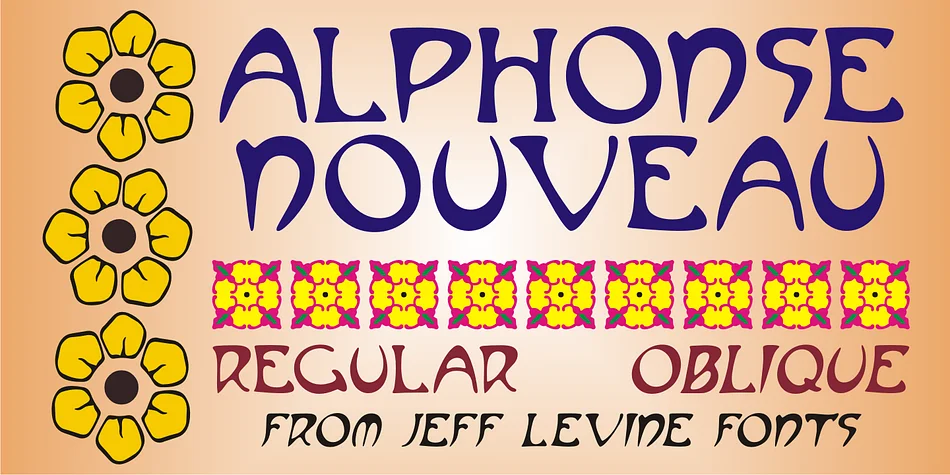
About ALPHONSE NOUVEAU JNL Font
Picture yourself designing a luxury fragrance bottle label or crafting an invitation for an upscale gallery opening. That's where Alphonse Nouveau JNL from Jeff Levine Fonts truly excels. This decorative typeface draws its inspiration directly from the ornamental letterforms of Alphonse Mucha, the legendary Art Nouveau artist whose illustrative work defined an entire visual era.
The font captures Mucha's distinctive sensibility, flowing with curves that mimic nature and ornamental details that balance refinement with expressive character. It's particularly well suited for vintage theater playbills, botanical product labels, luxury cosmetic packaging, and antique book cover designs where historical authenticity reinforces your brand message. The letterforms embody that distinctive Art Nouveau vocabulary, complete with flourishes and serifs that feel intentional and carefully constructed rather than merely decorative.
The typeface comes in both regular and oblique versions, which gives you genuine flexibility in how you structure your layouts and create visual hierarchy. The oblique works especially well as a complementary accent, and it's particularly useful when you want to suggest movement or flow within a design. You'll find Alphonse Nouveau JNL ready on Creative Fabrica whenever you need authentic period character for your next project.
Style & Use Cases
- Overall Style
- Bold, Distinctive
- Use Case
- Headlines, Posters
- Ideal For
- logos, packaging, and standout titles
- Pairs With
- a neutral sans-serif
How to Install ALPHONSE NOUVEAU JNL Font
Step-by-step instructions for every platform
- 1Download the ALPHONSE NOUVEAU JNL font file (.ttf or .otf).
- 2Locate the downloaded file in your Downloads folder.
- 3Right-click the font file.
- 4Select "Install" to install for the current user, or "Install for all users" to make it available system-wide.
- 5ALPHONSE NOUVEAU JNL is now available in Word, Photoshop, Illustrator, and all other apps.
More by Jeff Levine Fonts
View all →



Browse fonts by theme
Curated collections →Saw a font in a picture? Identify any font from an image with our free Font Finder.
More Decorative Fonts
Browse all →







What pairs well with ALPHONSE NOUVEAU JNL Font?
ALPHONSE NOUVEAU JNL Font is a decorative font that shines as a display or heading face. Pair it with a clean sans-serif or serif font for body text — the contrast creates a clear hierarchy while the two styles stay balanced and easy to read.




ALPHONSE NOUVEAU JNL Font
Reviewed by the FontBoxDL team · Updated June 2026