
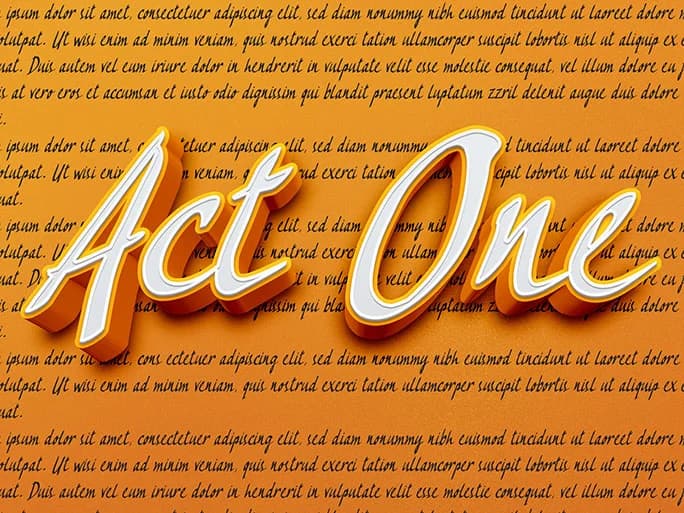
About Act One Font
Act One by Mbafonts is a playful script font that captures the essence of hand-lettered typography with modern flair. With its dynamic, expressive letterforms and bouncy rhythm, this handwritten typeface brings genuine personality and warmth to creative projects that need an authentic human touch rather than rigid perfection.
This versatile script works exceptionally well for wedding invitation suites, where its casual elegance strikes the right balance between formal sophistication and approachable charm. It's equally suited for creating custom greeting cards, designing hand-drawn styled logos for small businesses and artisan brands, and crafting personalized gift packaging labels. The font's energetic character also translates beautifully to children's book covers and storybook illustrations, playful social media graphics, and quirky event announcements. Creators appreciate it for projects that demand authenticity and artistic expression rather than corporate polish.
Act One brings genuine character to any design calling for a handwritten aesthetic without the time investment of manual lettering. Whether you're developing brand identity for a boutique shop, designing invitations for celebrations, or working on DIY craft projects and printed signage, this script offers the warmth and personality that authentically connects with audiences. Discover Act One on Creative Fabrica and enhance your font library with this charming, expressive handwritten style.
How to Install Act One Font Font
Step-by-step instructions for every platform
- 1Download the Act One Font font file (.ttf or .otf).
- 2Locate the downloaded file in your Downloads folder.
- 3Right-click the font file.
- 4Select "Install" to install for the current user, or "Install for all users" to make it available system-wide.
- 5Act One Font is now available in Word, Photoshop, Illustrator, and all other apps.
More by Mbafonts
View all →
More Script Handwritten Fonts
Browse all →







What pairs well with Act One Font?
Act One Font is a script font that shines as a display or heading face. Pair it with a clean sans-serif or serif font for body text — the contrast creates a clear hierarchy while the two styles stay balanced and easy to read.


