 Firefox
 1 / 2
1 / 2About Absinette Font
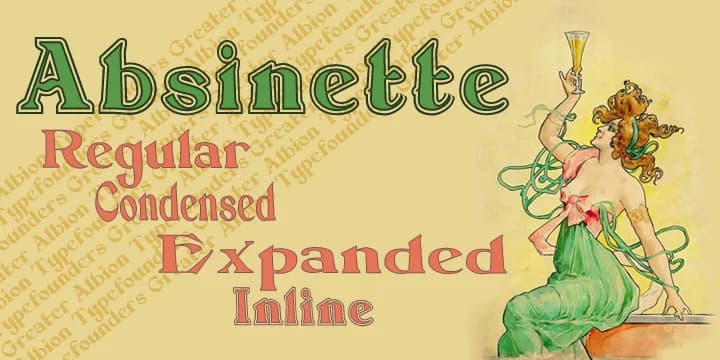
This typeface captures the elegant excess of Belle Époque aesthetics, all gilt mirrors and absinthe-soaked bistros lingering in the air. Absinette, created by Greater Albion Typefounders, is a decorative family offering three distinct widths alongside a striking inline variant that brings authentic period character to any vintage-inspired composition.
These letterforms excel across speakeasy menu covers, antique apothecary label sets, ornate wedding invitation suites with genuine historical resonance, and theatrical event posters that demand sophisticated presence. Three distinct widths give you real flexibility to scale complexity to match your specific layout without sacrificing readability. The inline variant deserves special attention, working best when you want ornamentation without visual overwhelm, letting negative space breathe through the letterforms themselves. Below the decorative flourishes, a Roman foundation keeps everything grounded even as ornamental elements dance around it. If you're building a heritage brand rooted in the 1890s or creating designs meant to feel authentically period-correct, this family knows when to whisper and when to command full attention.
Pair Absinette with a clean, understated serif or sans-serif for body text to keep readers grounded while the decorative face anchors your focal points. You'll find Absinette on Creative Fabrica, ready to bring that authentic 19th-century character to your next project.
Style & Use Cases
- Overall Style
- Bold, Distinctive
- Use Case
- Headlines, Posters
- Ideal For
- logos, packaging, and standout titles
- Pairs With
- a neutral sans-serif
How to Install Absinette Font
Step-by-step instructions for every platform
- 1Download the Absinette font file (.ttf or .otf).
- 2Locate the downloaded file in your Downloads folder.
- 3Right-click the font file.
- 4Select "Install" to install for the current user, or "Install for all users" to make it available system-wide.
- 5Absinette is now available in Word, Photoshop, Illustrator, and all other apps.
More by Greater Albion Typefounders
View all →

Browse fonts by theme
Curated collections →Saw a font in a picture? Identify any font from an image with our free Font Finder.
More Decorative Fonts
Browse all →







What pairs well with Absinette Font?
Absinette Font is a decorative font that shines as a display or heading face. Pair it with a clean sans-serif or serif font for body text — the contrast creates a clear hierarchy while the two styles stay balanced and easy to read.



Absinette Font
by Greater Albion Typefounders
Reviewed by the FontBoxDL team · Updated June 2026