 Firefox
 1 / 8
1 / 8About Able Lingo ASL 4 Font
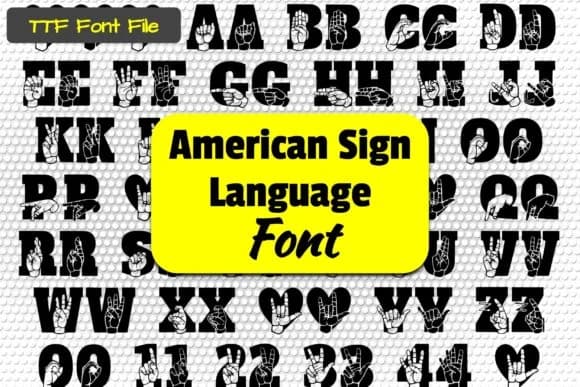
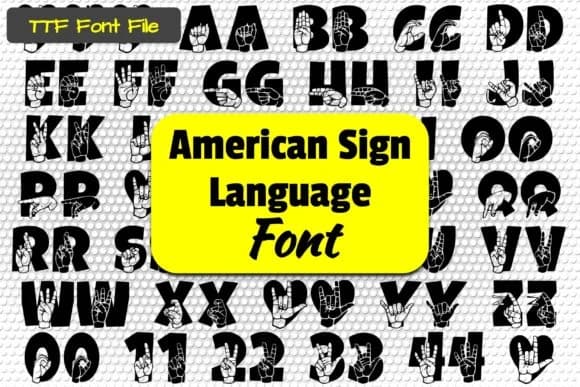
Able Lingo ASL 4 by Able Lingo is a dingbat font that brings American Sign Language into visual design work. Each character represents a hand sign from the ASL alphabet and numbers, making it a practical choice for anyone creating around deaf culture, accessibility initiatives, or sign language education. Unlike generic dingbats, this typeface renders actual hand gestures as readable pictographic characters, so your message communicates through recognized sign imagery rather than abstract symbols or decorative icons alone.
The font opens up genuine design possibilities for classroom posters teaching ASL basics, educational worksheets for language learners, greeting cards celebrating deaf awareness, and accessibility-focused graphics for community organizations. Designers working on materials for Deaf communities and advocates find that it adds authentic visual representation without relying on stock photography or complicated illustrations. The hand signs remain clear and recognizable at various scales, which matters when you're creating materials that need to perform equally well whether printed large or kept small. Organizations focused on inclusive communication, educators, and parents can incorporate meaningful imagery directly into their print and digital projects with genuine ease.
Get Able Lingo ASL 4 from Creative Fabrica to expand your toolkit with an essential resource for accessible, visually communicative design work.
Style & Use Cases
- Overall Style
- Iconographic, Asl Letters
- Use Case
- Icons, Accents
- Ideal For
- ornaments, bullets, and decorative flourishes
- Pairs With
- any text font
How to Install Able Lingo ASL 4 Font
Step-by-step instructions for every platform
- 1Download the Able Lingo ASL 4 font file (.ttf or .otf).
- 2Locate the downloaded file in your Downloads folder.
- 3Right-click the font file.
- 4Select "Install" to install for the current user, or "Install for all users" to make it available system-wide.
- 5Able Lingo ASL 4 is now available in Word, Photoshop, Illustrator, and all other apps.
More by Able Lingo
View all →
Browse fonts by theme
Curated collections →Saw a font in a picture? Identify any font from an image with our free Font Finder.
More Dingbats Fonts
Browse all →







What pairs well with Able Lingo ASL 4 Font?
Able Lingo ASL 4 Font is a versatile dingbats font that works for both headings and body text. Pair it with a contrasting sans-serif or serif font to add visual interest and a clear distinction between titles and body copy.



Able Lingo ASL 4 Font
by Able Lingo
Reviewed by the FontBoxDL team · Updated July 2026