 Firefox
 1 / 8
1 / 8About Able Lingo ASL Font
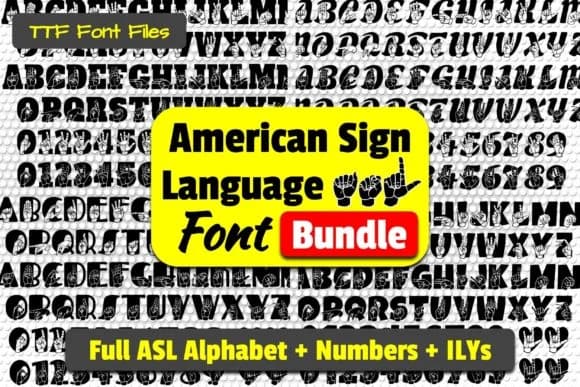
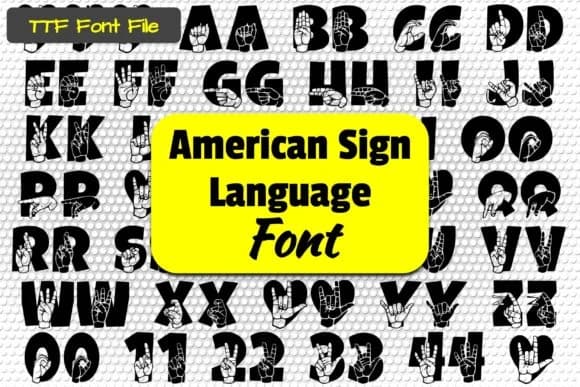
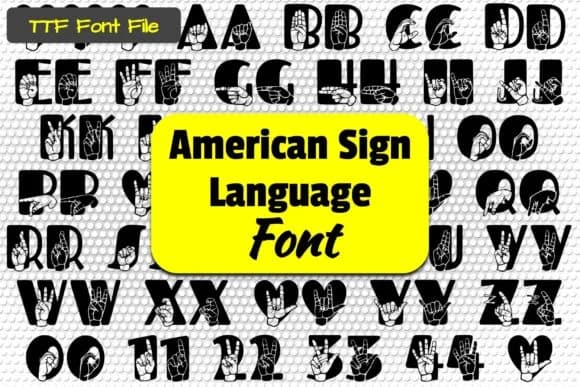
This typeface brings visual accessibility into your everyday design work. Able Lingo ASL, by Able Lingo, renders the complete American Sign Language alphabet and numbers as dingbat characters, making inclusive communication something you can build directly into your layouts.
The hand signs themselves become your letters and numbers, so you can embed ASL throughout your designs without needing photos or illustrations. This opens real possibilities in educational materials where children learning sign language benefit from seeing the actual hand forms alongside printed words, accessible event programs and concert signage that genuinely honor Deaf and Hard of Hearing audiences, craft marketplace labels where you want to convey warmth and human connection, and DIY classroom bulletin boards where kids can explore visual language through play. Because each character is a distinct hand shape, the forms remain legible and precise even at smaller scales, giving you full control over how your design reads.
Pair this with a clean sans-serif for any body text, and the combination really works well while the sign language stays visually strong throughout. Grab Able Lingo ASL from Creative Fabrica to bring sign language into the designs that deserve it.
Style & Use Cases
- Overall Style
- Iconographic, Asl Letters
- Use Case
- Icons, Accents
- Ideal For
- ornaments, bullets, and decorative flourishes
- Pairs With
- any text font
How to Install Able Lingo ASL Font
Step-by-step instructions for every platform
- 1Download the Able Lingo ASL font file (.ttf or .otf).
- 2Locate the downloaded file in your Downloads folder.
- 3Right-click the font file.
- 4Select "Install" to install for the current user, or "Install for all users" to make it available system-wide.
- 5Able Lingo ASL is now available in Word, Photoshop, Illustrator, and all other apps.
Browse fonts by theme
Curated collections →Saw a font in a picture? Identify any font from an image with our free Font Finder.
More Dingbats Fonts
Browse all →







What pairs well with Able Lingo ASL Font?
Able Lingo ASL Font is a versatile dingbats font that works for both headings and body text. Pair it with a contrasting sans-serif or serif font to add visual interest and a clear distinction between titles and body copy.



Able Lingo ASL Font
by Able Lingo
Reviewed by the FontBoxDL team · Updated June 2026