 Firefox
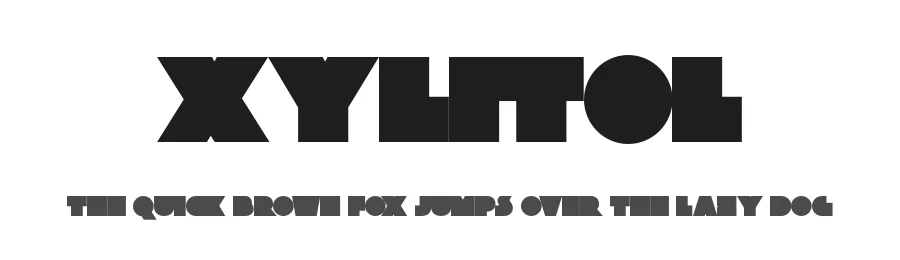 1 / 3
1 / 3Loading font…
About Xylitol Font
Xylitol is a multiple layer typeface you can use for creating chromatic, 3D effects. Its designed so the letters fit tightly together like Tetris blocks. There are four directional layers for the sides so you can simulate light coming from various directions. Theres a stripe layer which can be used to create a metallic shimmer effect. The Hollow style is made of thin outlines and has multiple uses. Use it on its own for an engineered, blueprint look. Make it black and overlay it on solid colors for a stained-glass effect. Set it to 50% gray and use a screen or color dodge effect at around 25% opacity to create a subtle sharpening effect. The solid layer can be offset to simulate a drop shadow. The Xylitol family includes a Solo style which has more conventional spacinghandy when you need accompanying flat text. An outline style is useful on its own of for doing layer transparency tricks. Its all about experimenting but here are some tips to get you started: Youll need to use an application that allows you to overlay layers of text. Every application has a unique way of dealing with this but generally, you type what you want, make several overlapping copies of the layer then alter each layers color and style. Some applications, like Photoshop ignore the fonts vertical metrics so you may need to vertically shift some of the layers to align. The diamond (lozenge) ◊ character contains a registration crosshair to help you get things lined up. Make sure youre not using optical kerning in Adobe apps. If youre using the front layer and all the edge layers, you might think its unnecessary to include the back layer. But the back layer can help obscure some of the background leaking through due to layer rendering imprecision. You might not need it but its there if you do. If you plan on including the Hollow style, I recommend using it as the first layer and checking carefully for unwanted overlaps before copying the layer. For example, the T may overlap A a tiny bit. Thats the way the typeface is designedthe priority is to have the edges set tight. You can fix the overlaps by adjusting tracking. Its no fun if you add Hollow as the final layer, notice an overlap, and realize that the tracking will have to be adjusted for each layer.
More...
Most Latin-based European, Greek, and some Cyrillic-based writing systems are supported, including the following languages. Afaan Oromo, Afar, Afrikaans, Albanian, Alsatian, Aromanian, Aymara, Bashkir (Latin), Basque, Belarusian (Latin), Bemba, Bikol, Bosnian, Breton, Bulgarian, Cape Verdean, Creole, Catalan, Cebuano, Chamorro, Chavacano, Chichewa, Crimean Tatar (Latin), Croatian, Czech, Danish, Dawan, Dholuo, Dutch, English, Estonian, Faroese, Fijian, Filipino, Finnish, French, Frisian, Friulian, Gagauz (Latin), Galician, Ganda, Genoese, German, Greek, Greenlandic, Guadeloupean Creole, Haitian Creole, Hawaiian, Hiligaynon, Hungarian, Icelandic, Ilocano, Indonesian, Irish, Italian, Jamaican, Kaqchikel, Karakalpak (Latin), Kashubian, Kikongo, Kinyarwanda, Kirundi, Komi-Permyak, Kurdish (Latin), Latvian, Lithuanian, Lombard, Low Saxon, Luxembourgish, Maasai, Macedonian, Makhuwa, Malay, Maltese, Māori, Moldovan, Montenegrin, Ndebele, Neapolitan, Norwegian, Novial, Occitan, Ossetian, Ossetian (Latin), Papiamento, Piedmontese, Polish, Portuguese, Quechua, Rarotongan, Romanian, Romansh, Russian, Sami, Sango, Saramaccan, Sardinian, Scottish Gaelic, Serbian, Serbian (Latin), Shona, Sicilian, Silesian, Slovak, Slovenian, Somali, Sorbian, Sotho, Spanish, Swahili, Swazi, Swedish, Tagalog, Tahitian, Tetum, Tongan, Tshiluba, Tsonga, Tswana, Tumbuka, Turkish, Turkmen (Latin), Tuvaluan, Uzbek (Latin), Ukrainian, Venetian, Vepsian, Võro, Walloon, Waray-Waray, Wayuu, Welsh, Wolof, Xhosa, Yapese, Zapotec Zulu and Zuni.
The fonts included in this archive are released under a no rights reserved Creative Commons Zero license. Please do not ask permission to do anything with these fonts. Whatever you want to do with these fonts, the answer will be yes. Please read about the CC0 Public Domain license before contacting me.
https://creativecommons.org/publicdomain/zero/1.0/
To the extent possible under law, Raymond Larabie has waived all copyright and related or neighboring rights to the fonts in this archive. This work is published from: Japan.
Style & Use Cases
- Overall Style
- Bold, Distinctive, Fancy
- Use Case
- Headlines, Posters
- Ideal For
- logos, packaging, and standout titles
- Pairs With
- a neutral sans-serif
How to Install Xylitol Font
Step-by-step instructions for every platform
- 1Download the Xylitol font file (.ttf or .otf).
- 2Locate the downloaded file in your Downloads folder.
- 3Right-click the font file.
- 4Select "Install" to install for the current user, or "Install for all users" to make it available system-wide.
- 5Xylitol is now available in Word, Photoshop, Illustrator, and all other apps.
More by Typodermic Fonts
View all →
Browse fonts by theme
Curated collections →Saw a font in a picture? Identify any font from an image with our free Font Finder.
More Decorative Fonts
Browse all →







What pairs well with Xylitol Font?
Xylitol Font is a decorative font that shines as a display or heading face. Pair it with a clean sans-serif or serif font for body text — the contrast creates a clear hierarchy while the two styles stay balanced and easy to read.




Premium Decorative Fonts
★ PremiumWant something with more weights, glyphs, and commercial polish? These premium decorative fonts are worth a look.
Xylitol Font
Reviewed by the FontBoxDL team · Updated October 2026
License: Public domain / GPL / OFL