 Firefox
 1 / 5
1 / 5About Wurm Font
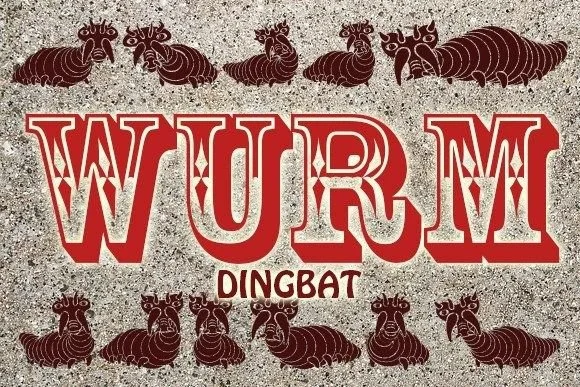
Wurm is a dingbat typeface by vladimirnikolic composed entirely of hand-drawn worm and creature characters that function as individual illustrations rather than traditional letterforms. Each glyph delivers a small dose of organic, playful personality to any layout, making this font feel less like type and more like visual storytelling that appeals to audiences who crave warmth and character.
This typeface excels for children's book illustration projects, nature-themed greeting card suites, and educational materials aimed at young learners. Designers working on Etsy product labels, garden center signage, or DIY craft projects will appreciate how the hand-drawn quality adds instant charm without requiring you to commission custom artwork. The creature imagery works beautifully across boutique animal-themed branding, nonprofit environmental campaigns, and kid-focused stationery design. Every character reads as friendly and approachable, which means even bold headlines maintain a gentle, non-threatening presence that younger audiences naturally gravitate toward.
Wurm speaks to designers and brands that want to feel authentic and handmade rather than corporate or sterile. For anyone building visual identity for a children's product line or designing illustrated educational materials, this dingbat delivers immediate personality and organic appeal. Grab Wurm on Creative Fabrica to start adding these playful creatures to your projects.
Style & Use Cases
- Overall Style
- Iconographic, Wurm
- Use Case
- Icons, Accents
- Ideal For
- ornaments, bullets, and decorative flourishes
- Pairs With
- any text font
How to Install Wurm Font
Step-by-step instructions for every platform
- 1Download the Wurm font file (.ttf or .otf).
- 2Locate the downloaded file in your Downloads folder.
- 3Right-click the font file.
- 4Select "Install" to install for the current user, or "Install for all users" to make it available system-wide.
- 5Wurm is now available in Word, Photoshop, Illustrator, and all other apps.
More by vladimirnikolic
View all →


Browse fonts by theme
Curated collections →Saw a font in a picture? Identify any font from an image with our free Font Finder.
More Dingbats Fonts
Browse all →







What pairs well with Wurm Font?
Wurm Font is a versatile dingbats font that works for both headings and body text. Pair it with a contrasting sans-serif or serif font to add visual interest and a clear distinction between titles and body copy.




Wurm Font
Reviewed by the FontBoxDL team · Updated July 2026