 Firefox
 1 / 8
1 / 8Loading font…
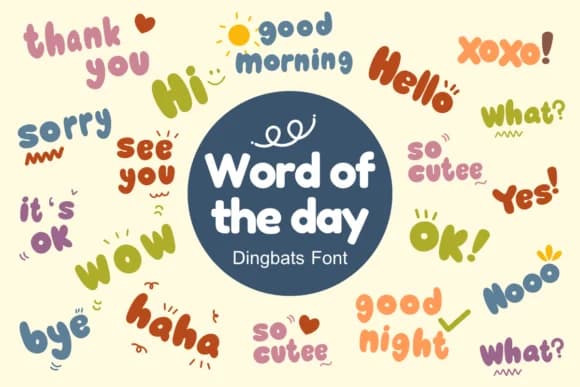
About Word of the Day Font
Picture yourself making Valentine sticker sheets for a classroom exchange, and you need friendly word-bubbles without spending hours hand-lettering each one. Word of the Day, designed by Nun Sukhwan, is a playful dingbat font packed with precomposed phrase-glyphs: "Good morning," "Thank you," "Sorry," "Yes," "No," and countless others. Each phrase works as a single keystroke, which means you skip the layer-juggling entirely and get consistent, polished results in half the time.
This font shines for handmade greeting card suites, DIY craft sticker projects, boutique product labels, and teacher reward systems. The vintage leaning character suits planner stickers and page decoration just as naturally as it does small logo marks or decorative badges. Because every phrase is its own glyph, you maintain visual consistency throughout your design without wrestling with multiple text layers or kerning issues.
The monochrome palette gives you clean legibility whether printed large or small, and it works beautifully into background pattern fills for product packaging and scrapbook layouts. Kids' craft workshops, personalized stationery collections, and handmade gift tags all benefit from this straightforward, efficient approach. The font handles the heavy lifting so you can focus on assembly and decoration. Pick it up on Creative Fabrica and build projects that feel genuinely handcrafted instead of design-template generic.
Style & Use Cases
- Overall Style
- Iconographic, Dingbats Font
- Use Case
- Icons, Accents
- Ideal For
- ornaments, bullets, and decorative flourishes
- Pairs With
- any text font
How to Install Word of the Day Font
Step-by-step instructions for every platform
- 1Download the Word of the Day font file (.ttf or .otf).
- 2Locate the downloaded file in your Downloads folder.
- 3Right-click the font file.
- 4Select "Install" to install for the current user, or "Install for all users" to make it available system-wide.
- 5Word of the Day is now available in Word, Photoshop, Illustrator, and all other apps.
More by Nun Sukhwan
View all →

Browse fonts by theme
Curated collections →Saw a font in a picture? Identify any font from an image with our free Font Finder.
More Dingbats Fonts
Browse all →





What pairs well with Word of the Day Font?
Word of the Day Font is a versatile dingbats font that works for both headings and body text. Pair it with a contrasting sans-serif or serif font to add visual interest and a clear distinction between titles and body copy.



Word of the Day Font
by Nun Sukhwan
Reviewed by the FontBoxDL team · Updated October 2026