 Firefox
 1 / 10
About Wonky Font
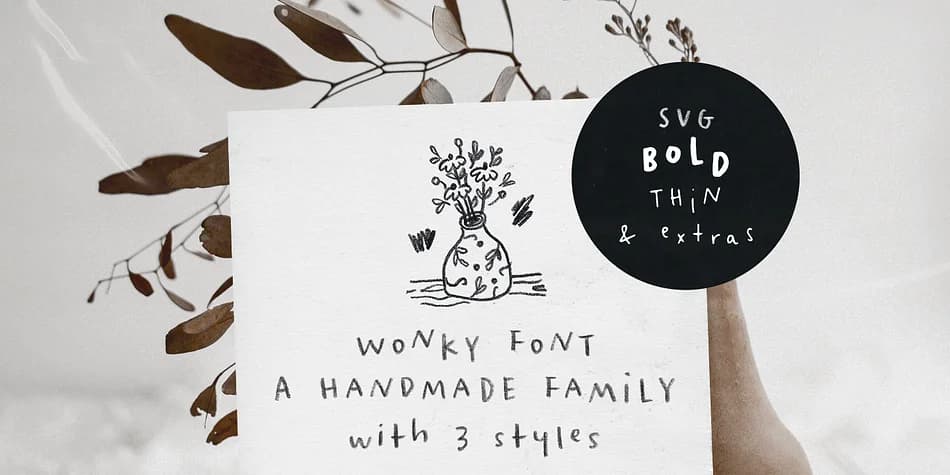
This font feels refreshingly sketchy and alive on the page. Wonky is a three-font family by Ana's Fonts, each drawn with a different tool: pencil, thin pen, and marker, capturing that genuine handmade character you can't fake with a digital brush.
What makes Wonky special is the contextual alternates built in. Each letter and number has three variations, so when you type, the font naturally swaps between different forms and keeps the hand-drawn feel consistent. The pencil version comes as an SVG file with real texture detail, perfect for designs where you want authentic sketch marks visible. You get three separate files (pencil SVG, thin weight, and bold weight) to choose from, plus a doodles font packed with 26 pencil sketches you can drop into your layouts.
This typeface works beautifully at small sizes and really punches when set in all caps. Use it for wedding invitation suites, Etsy product labels, small-batch branding projects, and social media graphics where handmade character feels right. SVG support requires Photoshop CC2017+ or Illustrator CC2018+, but OTF and TTF versions are included if those aren't available. Pair Wonky with a clean geometric sans for body text to keep visual hierarchy clear, then find it on Creative Fabrica.
Style & Use Cases
- Overall Style
- Iconographic
- Use Case
- Icons, Accents
- Ideal For
- ornaments, bullets, and decorative flourishes
- Pairs With
- any text font
How to Install Wonky Font
Step-by-step instructions for every platform
- 1Download the Wonky font file (.ttf or .otf).
- 2Locate the downloaded file in your Downloads folder.
- 3Right-click the font file.
- 4Select "Install" to install for the current user, or "Install for all users" to make it available system-wide.
- 5Wonky is now available in Word, Photoshop, Illustrator, and all other apps.
More by Ana's Fonts
View all →
Browse fonts by theme
Curated collections →Saw a font in a picture? Identify any font from an image with our free Font Finder.
More Dingbats Fonts
Browse all →







What pairs well with Wonky Font?
Wonky Font is a versatile dingbats font that works for both headings and body text. Pair it with a contrasting sans-serif or serif font to add visual interest and a clear distinction between titles and body copy.



Wonky Font
by Ana's Fonts
Reviewed by the FontBoxDL team · Updated August 2026