 Firefox
 1 / 8
1 / 8About Wink Wink Font
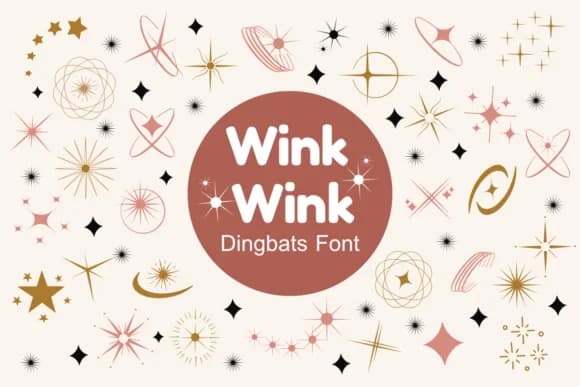
Wink Wink, designed by Nun Sukhwan, is a dingbats collection that wholly replaces standard letterforms with decorative stars, florals, vintage doodles, and playful symbols throughout. Rather than giving you words, it gives you building blocks for visual design. Each glyph stands alone as a complete design element, pulling from a handmade, nostalgic aesthetic that feels warm without being saccharine. This vintage sensibility paired with the playful character makes the collection work beautifully across a range of applications.
This font works best in hands-on design work where the decorative symbols become true protagonists, not supporting players. Valentine card embellishments, custom t-shirt graphics, kid-friendly sticker sheets, and scrapbook layouts all benefit from having direct access to these decorative shapes. Teachers assembling bulletin boards and classroom decorations will find quick visual appeal here, as will greeting card makers layering these symbols over base text. The vintage leaning and playful character also suit quirky logo work, particularly for small businesses and craft-focused brands aiming for an approachable, handmade feel.
This is for designers and makers who work directly in craft and creation, whether digitally or in print. You'll find Wink Wink on Creative Fabrica, ready to download and integrate right into all your projects.
Style & Use Cases
- Overall Style
- Iconographic, Glitter
- Use Case
- Icons, Accents
- Ideal For
- ornaments, bullets, and decorative flourishes
- Pairs With
- any text font
How to Install Wink Wink Font
Step-by-step instructions for every platform
- 1Download the Wink Wink font file (.ttf or .otf).
- 2Locate the downloaded file in your Downloads folder.
- 3Right-click the font file.
- 4Select "Install" to install for the current user, or "Install for all users" to make it available system-wide.
- 5Wink Wink is now available in Word, Photoshop, Illustrator, and all other apps.
More by Nun Sukhwan
View all →



Browse fonts by theme
Curated collections →Saw a font in a picture? Identify any font from an image with our free Font Finder.
More Dingbats Fonts
Browse all →







What pairs well with Wink Wink Font?
Wink Wink Font is a versatile dingbats font that works for both headings and body text. Pair it with a contrasting sans-serif or serif font to add visual interest and a clear distinction between titles and body copy.



Wink Wink Font
by Nun Sukhwan
Reviewed by the FontBoxDL team · Updated June 2026