 Firefox
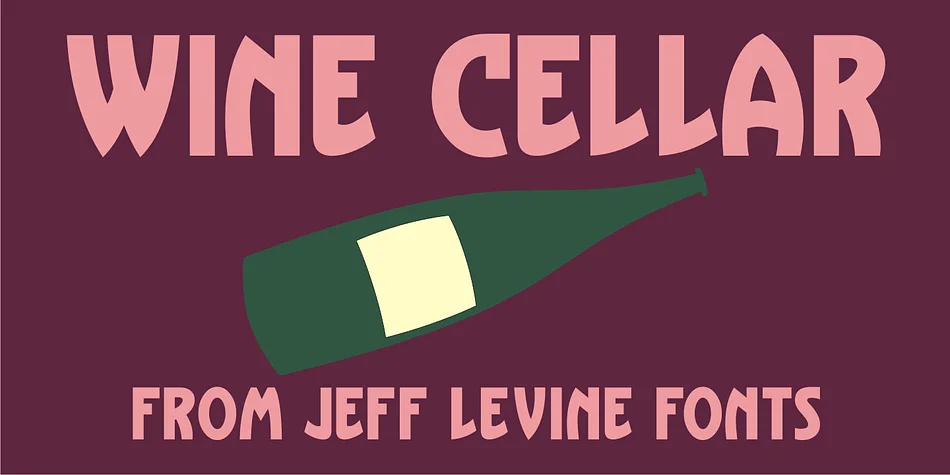
About WINE CELLAR JNL Font
There's something undeniably speakeasy-chic about this decorative typeface. WINE CELLAR JNL, designed by Jeff Levine Fonts, was drawn from 1930s-era sheet music hand lettering and carries the visual confidence of that prohibition decade. The bold, casual letterforms reveal clear Art Nouveau influences and subtle echoes of the iconic Hobo metal typeface, creating a personality that balances sophistication with playfulness.
Retro cocktail bar menus and speakeasy event invitations immediately come to mind as natural homes for this font. Craft beverage labels with a vintage bootleg aesthetic work beautifully, as do antique shop signage and jazz-age poster designs. Rustic wine cellar branding, indie packaging projects, and historical event materials all benefit from its confident, hand-drawn character. The typeface's warmth and casual energy deliver authentic retro flavor without feeling sterile or over-worked, a difficult balance for decorative faces to strike. That restraint makes it genuinely versatile across a wider range of projects than you might initially expect.
Pair WINE CELLAR JNL with a clean, neutral sans-serif for body copy to establish proper visual hierarchy and maintain readability. The combination lets this display face do the storytelling while your sans-serif handles the supporting role. Grab it on Creative Fabrica and add that genuine 1930s charm to your next project.
Style & Use Cases
- Overall Style
- Bold, Distinctive
- Use Case
- Headlines, Posters
- Ideal For
- logos, packaging, and standout titles
- Pairs With
- a neutral sans-serif
How to Install WINE CELLAR JNL Font
Step-by-step instructions for every platform
- 1Download the WINE CELLAR JNL font file (.ttf or .otf).
- 2Locate the downloaded file in your Downloads folder.
- 3Right-click the font file.
- 4Select "Install" to install for the current user, or "Install for all users" to make it available system-wide.
- 5WINE CELLAR JNL is now available in Word, Photoshop, Illustrator, and all other apps.
More by Jeff Levine Fonts
View all →



Browse fonts by theme
Curated collections →Saw a font in a picture? Identify any font from an image with our free Font Finder.
More Decorative Fonts
Browse all →







What pairs well with WINE CELLAR JNL Font?
WINE CELLAR JNL Font is a decorative font that shines as a display or heading face. Pair it with a clean sans-serif or serif font for body text — the contrast creates a clear hierarchy while the two styles stay balanced and easy to read.




WINE CELLAR JNL Font
Reviewed by the FontBoxDL team · Updated June 2026