 Firefox
 1 / 5
1 / 5About Wedding Icons Font
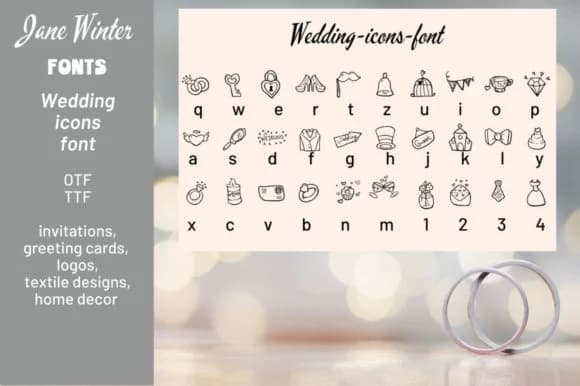
This one carries the warmth of celebration and intimacy. Wedding Icons is a dingbat collection by Stella Sky, built around 30 custom icons that speak directly to the language of romance and commitment. Rather than generic flourishes, you get symbols designed with thoughtful intention: rings, hearts, silhouettes of couples, and architectural ornaments that feel genuinely earned rather than tacked on.
Use these for wedding invitation suites where the icons can elegantly separate sections of text or anchor design corners and borders. Save-the-date cards really benefit from their tonal consistency and symbolic weight when you need something more sophisticated than default decorative fonts. Valentine's Day cards and anniversary announcements are natural applications, as are personalized gift tags where you need visual markers that signal care without overwhelming the primary message. The collection also works beautifully in scrapbooking layouts and on craft-forward projects where symbolic detail and visual storytelling matter. Available in both OTF and TTF formats, it plugs into any design workflow without adding complexity.
Pair it with a clean serif or neutral sans-serif for body text, which keeps these icons as your focal point and maintains readability across the entire design. Grab it on Creative Fabrica and you're set to add both ornament and genuine meaning to your next romantic or commemorative project.
Style & Use Cases
- Overall Style
- Iconographic, Wedding Icons
- Use Case
- Icons, Accents
- Ideal For
- ornaments, bullets, and decorative flourishes
- Pairs With
- any text font
How to Install Wedding Icons Font
Step-by-step instructions for every platform
- 1Download the Wedding Icons font file (.ttf or .otf).
- 2Locate the downloaded file in your Downloads folder.
- 3Right-click the font file.
- 4Select "Install" to install for the current user, or "Install for all users" to make it available system-wide.
- 5Wedding Icons is now available in Word, Photoshop, Illustrator, and all other apps.
Browse fonts by theme
Curated collections →Saw a font in a picture? Identify any font from an image with our free Font Finder.
More Dingbats Fonts
Browse all →







What pairs well with Wedding Icons Font?
Wedding Icons Font is a versatile dingbats font that works for both headings and body text. Pair it with a contrasting sans-serif or serif font to add visual interest and a clear distinction between titles and body copy.



Wedding Icons Font
by Stella Sky
Reviewed by the FontBoxDL team · Updated July 2026