 Firefox
 1 / 8
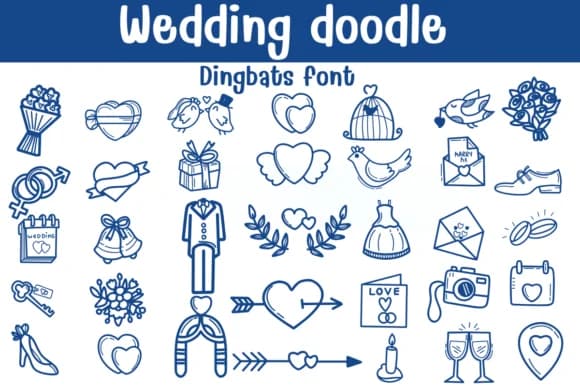
1 / 8About Wedding Doodle Font
Imagine laying out an engagement party invitation suite and needing quick doodle elements that feel personal, not generic. Wedding Doodle, designed by Sontaya, is a dingbat collection built for that exact moment. Each glyph is a hand-drawn sketch that brings warmth to anything from ceremony programs to DIY thank-you notes, with icons that range from delicate rings and doves to champagne flutes and floral sprays. The sketches have a natural, illustration-forward quality that feels intentional rather than cutesy.
This font works beautifully in two ways: use it to add charming icons to wedding stationery sets, bridal shower place cards, save-the-date designs, and seating cards, or layer it with other typefaces for a playful, mixed-media look. The outline versions let you hand-color individual elements in Procreate or Affinity Photo if you want a more custom, painted finish. Available in both OTF and TTF formats, it works with most design tools, so your desktop and iPad workflows stay flexible.
The sketchy style means it reads with personality at any size. Try it for full-page doodle backgrounds, small decorative callouts, or icon spot illustrations in your layouts. If you're building wedding suite templates or designing boutique stationery collections, this one deserves a spot in your toolkit. Find it on Creative Fabrica and add it to your growing library.
Style & Use Cases
- Overall Style
- Iconographic, Fonts
- Use Case
- Icons, Accents
- Ideal For
- ornaments, bullets, and decorative flourishes
- Pairs With
- any text font
How to Install Wedding Doodle Font
Step-by-step instructions for every platform
- 1Download the Wedding Doodle font file (.ttf or .otf).
- 2Locate the downloaded file in your Downloads folder.
- 3Right-click the font file.
- 4Select "Install" to install for the current user, or "Install for all users" to make it available system-wide.
- 5Wedding Doodle is now available in Word, Photoshop, Illustrator, and all other apps.
Browse fonts by theme
Curated collections →Saw a font in a picture? Identify any font from an image with our free Font Finder.
More Dingbats Fonts
Browse all →







What pairs well with Wedding Doodle Font?
Wedding Doodle Font is a versatile dingbats font that works for both headings and body text. Pair it with a contrasting sans-serif or serif font to add visual interest and a clear distinction between titles and body copy.



Wedding Doodle Font
by Sontaya
Reviewed by the FontBoxDL team · Updated August 2026