 Firefox
 1 / 8
1 / 8About Wedding Cute 1 Font
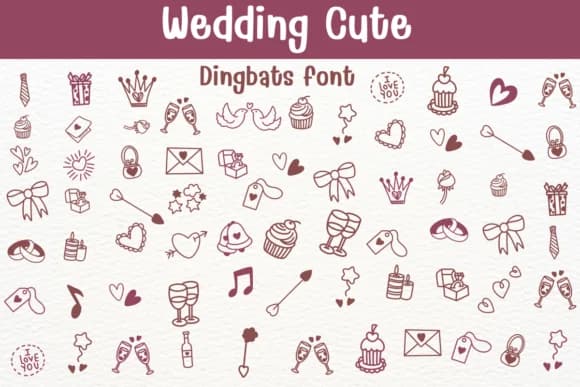
Playful and romantic in equal measure. Wedding Cute 1 by Sontaya is a dingbat collection that speaks the visual language of celebration. The typeface transforms every keystroke into a hand-drawn icon: hearts, rings, champagne flutes, tiered cakes, doves, gift boxes, arrows, and flourishes that feel genuine without being overly detailed. Each glyph carries a sense of joy, the kind you'd sketch by hand if you had infinite time.
This works beautifully on wedding invitation suites, save-the-date cards, and personalized gift tags where you need decorative elements that feel intentional rather than mass-produced. Etsy sellers use it for stationery and wax seal designs. DIY craft enthusiasts pair it with hand-lettered text for signage and scrapbooking layouts. The line weight stays consistent across the full set, so the icons read clearly whether you scale them up for a poster or down for tiny label work. You can layer these icons over solid backgrounds, scatter them as borders, or let them breathe on their own as standalone accents.
Pair Wedding Cute 1 with a clean, minimal sans-serif (something like a modern geometric typeface) to let the dingbats shine without visual chaos. Grab it on Creative Fabrica and add warmth to your next celebratory project.
Style & Use Cases
- Overall Style
- Iconographic, Cute
- Use Case
- Icons, Accents
- Ideal For
- ornaments, bullets, and decorative flourishes
- Pairs With
- any text font
How to Install Wedding Cute 1 Font
Step-by-step instructions for every platform
- 1Download the Wedding Cute 1 font file (.ttf or .otf).
- 2Locate the downloaded file in your Downloads folder.
- 3Right-click the font file.
- 4Select "Install" to install for the current user, or "Install for all users" to make it available system-wide.
- 5Wedding Cute 1 is now available in Word, Photoshop, Illustrator, and all other apps.
Browse fonts by theme
Curated collections →Saw a font in a picture? Identify any font from an image with our free Font Finder.
More Dingbats Fonts
Browse all →







What pairs well with Wedding Cute 1 Font?
Wedding Cute 1 Font is a versatile dingbats font that works for both headings and body text. Pair it with a contrasting sans-serif or serif font to add visual interest and a clear distinction between titles and body copy.



Wedding Cute 1 Font
by Sontaya
Reviewed by the FontBoxDL team · Updated August 2026