
 1 / 8
1 / 8About Vintage Flower Font
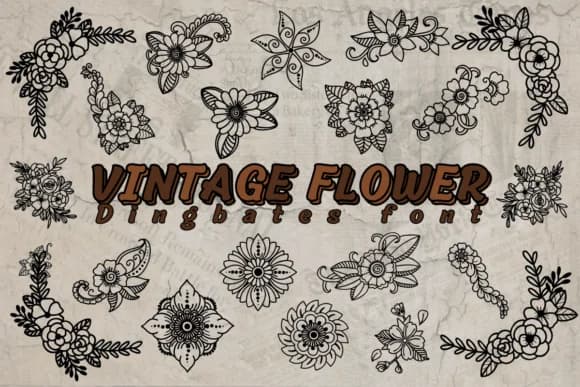
Vintage Flower, by designer Chonada, replaces every letter with a hand-drawn botanical bloom rendered in fine outlines and organic linework. Each character becomes a design element in its own right, shifting the aesthetic from purely decorative to intentionally artful. The collection works as a true dingbat font, meaning you're selecting individual florals rather than letters, giving you creative control over composition and placement.
This font excels when botanical elements are the primary visual focus, not background filler. Botanical journal spreads immediately gain personality from its line-based precision and sketchy, authentic feel, while letterpress-style wedding invitation inserts use the blooms to frame text elegantly. The aesthetic also shines in custom Etsy graphics for natural product shops, where the hand-drawn quality builds trust with customers. Because of its consistent line weight, the design translates cleanly to embroidery digitization, small batch product stickers, screen-printed tea towels, and packaging labels for artisanal skincare, herbal remedies, or specialty tea lines.
Designers building botanical-themed identities or adding hand-drawn elements to craft and nature-focused projects will find this font immediately useful. From DIY craft labels to complete botanical brand packages, the individual floral characters offer versatility and visual impact. Pick up Vintage Flower from Creative Fabrica and use it in your next floral-forward design.
Style & Use Cases
- Overall Style
- Iconographic, Element
- Use Case
- Icons, Accents
- Ideal For
- ornaments, bullets, and decorative flourishes
- Pairs With
- any text font
How to Install Vintage Flower Font
Step-by-step instructions for every platform
- 1Download the Vintage Flower font file (.ttf or .otf).
- 2Locate the downloaded file in your Downloads folder.
- 3Right-click the font file.
- 4Select "Install" to install for the current user, or "Install for all users" to make it available system-wide.
- 5Vintage Flower is now available in Word, Photoshop, Illustrator, and all other apps.




Browse fonts by theme
Curated collections →Saw a font in a picture? Identify any font from an image with our free Font Finder.
More Dingbats Fonts
Browse all →







What pairs well with Vintage Flower Font?
Vintage Flower Font is a versatile dingbats font that works for both headings and body text. Pair it with a contrasting sans-serif or serif font to add visual interest and a clear distinction between titles and body copy.



Vintage Flower Font
by Chonada
Reviewed by the FontBoxDL team · Updated July 2026