
 1 / 8
1 / 8About Valentine Rose Font
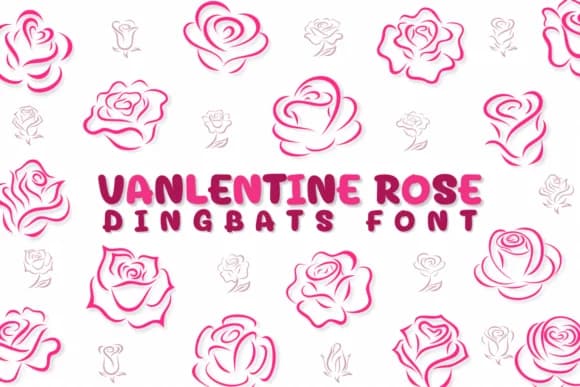
Valentine Rose by Chonada is a dingbat collection that trades traditional letterforms for illustrated roses and ornamental flourishes, all hand-sketched in a loose, flowing style that feels both romantic and intimate. The overall aesthetic leans squarely into boho sensibility, where delicate illustration meets decorative mark-making at every turn. Each glyph carries that same sketchy, almost artisanal quality, designed to add warmth and personality to projects where charm and handmade appeal outweigh rigid formality.
You'll get real mileage from this font on Valentine's Day greeting cards, love note stationery sets, and wedding invitation suites that call for a softer, more handmade feel. The illustrated roses and decorative elements shine particularly well on Etsy product packaging for artisanal goods and boutique gift tags, or across DIY craft projects and scrapbooking layouts where illustration matters. Procreate users and digital note-takers working in apps like GoodNotes will appreciate how the dingbats integrate with freehand sketches and handwritten layouts, creating that cohesive sketched-by-hand look without the manual time investment. Since each mark is already hand-drawn, your designs pick up personality and visual interest without extra effort on your part.
Valentine Rose suits anyone building romantic, informal designs or celebration-focused stationery where personality beats polish. Find it on Creative Fabrica.
Style & Use Cases
- Overall Style
- Iconographic, Valentine
- Use Case
- Icons, Accents
- Ideal For
- ornaments, bullets, and decorative flourishes
- Pairs With
- any text font
How to Install Valentine Rose Font
Step-by-step instructions for every platform
- 1Download the Valentine Rose font file (.ttf or .otf).
- 2Locate the downloaded file in your Downloads folder.
- 3Right-click the font file.
- 4Select "Install" to install for the current user, or "Install for all users" to make it available system-wide.
- 5Valentine Rose is now available in Word, Photoshop, Illustrator, and all other apps.
More by Chonada
View all →


Browse fonts by theme
Curated collections →Saw a font in a picture? Identify any font from an image with our free Font Finder.
More Dingbats Fonts
Browse all →







What pairs well with Valentine Rose Font?
Valentine Rose Font is a versatile dingbats font that works for both headings and body text. Pair it with a contrasting sans-serif or serif font to add visual interest and a clear distinction between titles and body copy.



Valentine Rose Font
by Chonada
Reviewed by the FontBoxDL team · Updated June 2026