 Firefox
 1 / 4
1 / 4About VICTORY SPEECH Font
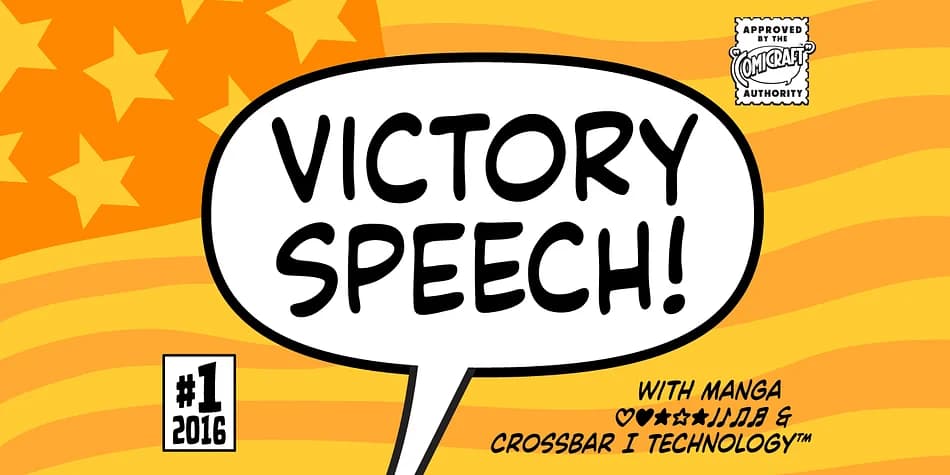
Picture a stadium holding its breath before the final announcement, then erupting into roars as the winner's name flashes across the screen in bold, commanding type. That's Victory Speech, a decorative font by Comicraft designed to make voices heard. With its theatrical flair and commanding presence, it's built for high-stakes moments and bold declarations.
This is the font you reach for when whisper won't cut it. Political campaign posters, sports victory graphics, awards night sequences, and vintage spectacle signage all come alive with Victory Speech's authoritative weight. The letterforms have a retro-comic energy that feels both powerful and playful, sitting somewhere between propaganda art and vintage showmanship. Its theatrical DNA makes it work beautifully for movie titles, dramatic event branding, and anything announcing something big.
The font ships in four weights with alternate uppercase alphabets to add variety, plus full support for Western and Central European languages along with Cyrillic. The Manga characters and Crossbar I Technology give you even more flexibility for unconventional lettering work. At display sizes, Victory Speech commands attention without losing its distinctive personality, equally at home in retro sports posters and contemporary political campaigns. Grab it from Creative Fabrica and let your headlines have their moment.
Style & Use Cases
- Overall Style
- Bold, Distinctive
- Use Case
- Headlines, Posters
- Ideal For
- logos, packaging, and standout titles
- Pairs With
- a neutral sans-serif
How to Install VICTORY SPEECH Font
Step-by-step instructions for every platform
- 1Download the VICTORY SPEECH font file (.ttf or .otf).
- 2Locate the downloaded file in your Downloads folder.
- 3Right-click the font file.
- 4Select "Install" to install for the current user, or "Install for all users" to make it available system-wide.
- 5VICTORY SPEECH is now available in Word, Photoshop, Illustrator, and all other apps.
More by Comicraft
View all →
Browse fonts by theme
Curated collections →Saw a font in a picture? Identify any font from an image with our free Font Finder.
More Decorative Fonts
Browse all →







What pairs well with VICTORY SPEECH Font?
VICTORY SPEECH Font is a decorative font that shines as a display or heading face. Pair it with a clean sans-serif or serif font for body text — the contrast creates a clear hierarchy while the two styles stay balanced and easy to read.



VICTORY SPEECH Font
by Comicraft
Reviewed by the FontBoxDL team · Updated July 2026