 Firefox
 1 / 8
1 / 8About Veggie Font
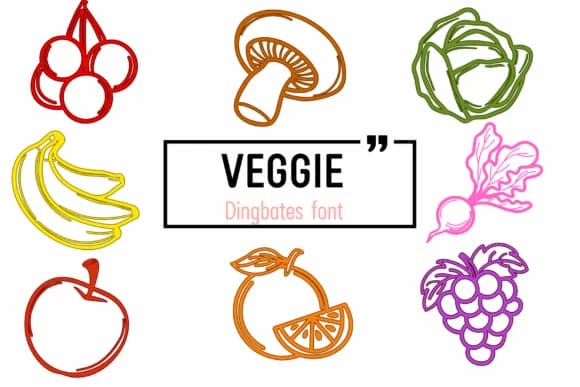
This font radiates authentic warmth and playfulness at first glance. Veggie, created by Chada Art, is a dingbat collection of hand-drawn fruits and vegetables that brings genuine visual life to any design project. Each character is an individual illustration of something you'd find at a farmers market or backyard garden: carrots, tomatoes, bell peppers, leafy greens, and strawberries. They're rendered with a sketchy line weight and natural color palette that feels both intentional and organic.
What makes Veggie work across so many different applications is its specificity. Organic grocery packaging benefits immediately from its friendly, approachable aesthetic, while wellness app icon sets gain authentic visual charm. You'll find it equally useful on farmers market label stickers, community garden signage, recipe cards designed for social sharing, or DIY meal planning spreads. The playful outlines suit nature-focused branding and health-conscious content without feeling overwrought.
Since each dingbat works as a standalone icon, pair Veggie with a clean, modern sans-serif for any body text, letting the vegetable illustrations take center stage. Find it on Creative Fabrica and add this charming set to your design library.
Style & Use Cases
- Overall Style
- Iconographic, Vegetable
- Use Case
- Icons, Accents
- Ideal For
- ornaments, bullets, and decorative flourishes
- Pairs With
- any text font
How to Install Veggie Font
Step-by-step instructions for every platform
- 1Download the Veggie font file (.ttf or .otf).
- 2Locate the downloaded file in your Downloads folder.
- 3Right-click the font file.
- 4Select "Install" to install for the current user, or "Install for all users" to make it available system-wide.
- 5Veggie is now available in Word, Photoshop, Illustrator, and all other apps.
More by Chada Art
View all →

Browse fonts by theme
Curated collections →Saw a font in a picture? Identify any font from an image with our free Font Finder.
More Dingbats Fonts
Browse all →







What pairs well with Veggie Font?
Veggie Font is a versatile dingbats font that works for both headings and body text. Pair it with a contrasting sans-serif or serif font to add visual interest and a clear distinction between titles and body copy.



Veggie Font
by Chada Art
Reviewed by the FontBoxDL team · Updated June 2026