 Firefox
 1 / 10
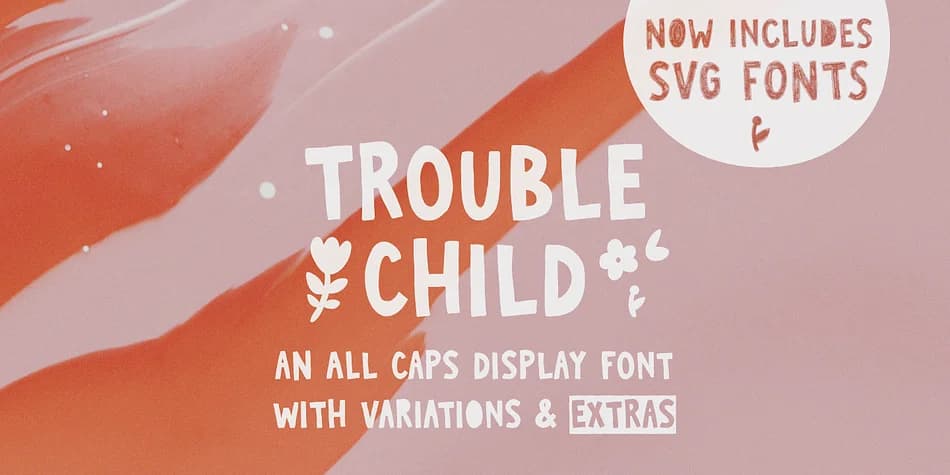
About TROUBLE CHILD Font
Trouble Child is an all-caps display typeface built for projects that need volume and personality. Ana's Fonts designed this one with bouncy, energetic letterforms that announce themselves on the page. Four distinct style variations are included (outline, blackout, underline, and outblack), letting you layer and combine without hunting for separate font files. You also get a companion Extras font packed with doodles, shapes, and decorative borders that work as natural partners to the main characters.
The package includes three SVG formats and 18 PNG doodles with transparent backgrounds, so you've got the flexibility for Photoshop, Illustrator, and web workflows. Every variation was designed to stack cleanly on top of the others, making it surprisingly simple to build complex layered compositions without the usual headaches.
This font belongs in projects where subtlety takes a back seat. Comic book lettering, graffiti-inspired brand marks, vinyl sticker designs, and zine layouts all read naturally in this typeface. Bands, gaming communities, small labels, and DIY creators recognize this as the obvious choice when attitude and visual impact are what matter most. You can find Trouble Child on Creative Fabrica.
Style & Use Cases
- Overall Style
- Iconographic
- Use Case
- Icons, Accents
- Ideal For
- ornaments, bullets, and decorative flourishes
- Pairs With
- any text font
How to Install TROUBLE CHILD Font
Step-by-step instructions for every platform
- 1Download the TROUBLE CHILD font file (.ttf or .otf).
- 2Locate the downloaded file in your Downloads folder.
- 3Right-click the font file.
- 4Select "Install" to install for the current user, or "Install for all users" to make it available system-wide.
- 5TROUBLE CHILD is now available in Word, Photoshop, Illustrator, and all other apps.
More by Ana's Fonts
View all →
Browse fonts by theme
Curated collections →Saw a font in a picture? Identify any font from an image with our free Font Finder.
More Dingbats Fonts
Browse all →







What pairs well with TROUBLE CHILD Font?
TROUBLE CHILD Font is a versatile dingbats font that works for both headings and body text. Pair it with a contrasting sans-serif or serif font to add visual interest and a clear distinction between titles and body copy.



TROUBLE CHILD Font
by Ana's Fonts
Reviewed by the FontBoxDL team · Updated August 2026