 Firefox
 1 / 4
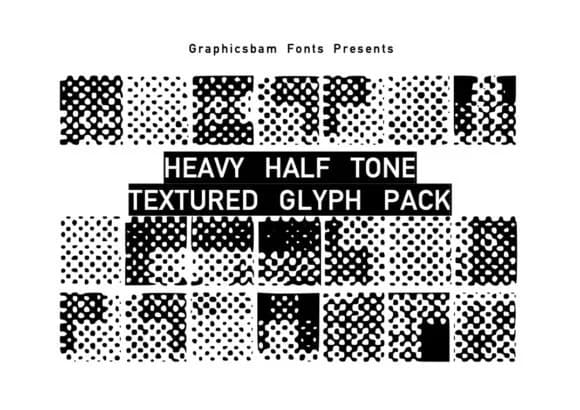
1 / 4About Texture Glyphs Font
Built by GraphicsBam Fonts, Texture Glyphs is a collection of halftone texture symbols that feel substantial and hand-made. The pack's distinctive quality comes from its halftone approach to texture: instead of smooth fills, each glyph builds visual depth through layered dots and patterns. This technique makes them work across different sizes and keeps them feeling crafted rather than generic. The set includes multiple texture densities, so you can pull subtle background effects or bold graphic elements depending on what your design needs.
Where these glyphs really excel is in projects that need tactile visual interest. Think t-shirt designs and mug graphics that benefit from texture detail, craft project labels fighting for attention on a shelf, nature-themed poster work, or handmade paper goods that need to feel intentional. Since you're working with glyphs rather than traditional fonts, there are no baseline or letter-spacing constraints. Layer them, rotate them, mix them into your designs however the project calls for it.
Product packaging, DIY craft signage, and school art projects all get better with texture. These glyphs work as building blocks for visual detail instead of forcing you into preset type treatments. You'll find Texture Glyphs on Creative Fabrica, ready to bring texture depth into your next design.
Style & Use Cases
- Overall Style
- Iconographic, Design
- Use Case
- Icons, Accents
- Ideal For
- ornaments, bullets, and decorative flourishes
- Pairs With
- any text font
How to Install Texture Glyphs Font
Step-by-step instructions for every platform
- 1Download the Texture Glyphs font file (.ttf or .otf).
- 2Locate the downloaded file in your Downloads folder.
- 3Right-click the font file.
- 4Select "Install" to install for the current user, or "Install for all users" to make it available system-wide.
- 5Texture Glyphs is now available in Word, Photoshop, Illustrator, and all other apps.
More by GraphicsBam Fonts
View all →
Browse fonts by theme
Curated collections →Saw a font in a picture? Identify any font from an image with our free Font Finder.
More Dingbats Fonts
Browse all →







What pairs well with Texture Glyphs Font?
Texture Glyphs Font is a versatile dingbats font that works for both headings and body text. Pair it with a contrasting sans-serif or serif font to add visual interest and a clear distinction between titles and body copy.



Texture Glyphs Font
Reviewed by the FontBoxDL team · Updated July 2026