 Firefox
 1 / 8
1 / 8Loading font…
About Teacher Font
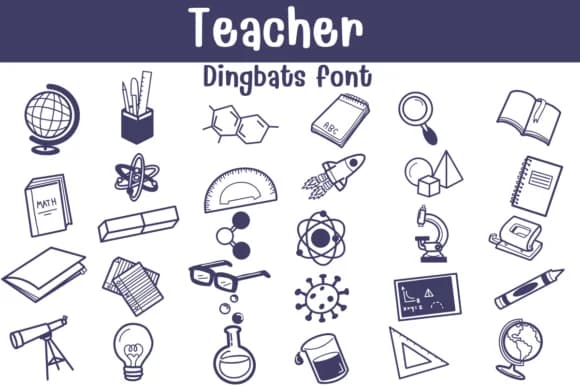
Picture a teacher setting up a classroom bulletin board or building activity worksheets that need quick, appealing symbols kids will actually notice and want to use every day. Teacher is a dingbats font by Sontaya, created specifically to serve school and learning contexts. The set excels for classroom wall posters, student reward badge designs, educational worksheet illustrations, and teacher planning stickers. Each glyph has genuine hand-drawn warmth and character but reads crystal-clear at any size, which is a detail that really matters when you're creating materials kids genuinely want to look at and interact with regularly.
The font comes in both OTF and TTF formats, so it integrates fully across Procreate, Affinity Designer, Affinity Photo, and most other modern design applications you might use. Black outlines on white backgrounds keep production straightforward and economical, whether you're printing a single laminated classroom poster or running off hundreds of activity sheets for the whole school year. The icon structure means you browse and select visually rather than typing combinations or hunting through alphabetic sequences looking for the exact symbol you need. Grab Teacher from Creative Fabrica and start making classroom materials that feel personally designed rather than recycled from generic template collections.
Style & Use Cases
- Overall Style
- Iconographic, Fonts
- Use Case
- Icons, Accents
- Ideal For
- ornaments, bullets, and decorative flourishes
- Pairs With
- any text font
How to Install Teacher Font
Step-by-step instructions for every platform
- 1Download the Teacher font file (.ttf or .otf).
- 2Locate the downloaded file in your Downloads folder.
- 3Right-click the font file.
- 4Select "Install" to install for the current user, or "Install for all users" to make it available system-wide.
- 5Teacher is now available in Word, Photoshop, Illustrator, and all other apps.

Browse fonts by theme
Curated collections →Saw a font in a picture? Identify any font from an image with our free Font Finder.
More Dingbats Fonts
Browse all →







What pairs well with Teacher Font?
Teacher Font is a versatile dingbats font that works for both headings and body text. Pair it with a contrasting sans-serif or serif font to add visual interest and a clear distinction between titles and body copy.



Teacher Font
by Sontaya
Reviewed by the FontBoxDL team · Updated October 2026