 Firefox
 1 / 8
1 / 8About Tattoo Halloween Font
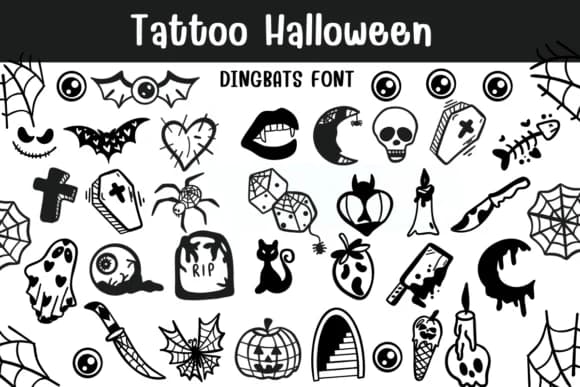
There's something instantly eerie about sketchy, hand-drawn icon work, and this font captures that feeling with genuine style. Tattoo Halloween, created by Sontaya, is a dingbats collection that channels authentic tattoo flash art through bold black line drawings. The aesthetic keeps everything feeling organic and deliberately rough, never polished or sterile, which is exactly the visual foundation you need for genuinely creepy Halloween mood.
Use it for Halloween party invitations that need serious visual bite, DIY costume labels and decorative gift tags that pop off the page, spooky scrapbooking layouts with a genuinely dark edge, and black t-shirt graphics that read like wearable tattoo designs. Spider web patterns, cartoon arachnids, and other tangled symbol marks let you build layered atmospheric effects without overworking the overall layout. Hand-drawn line work and intentional mark-making make a Halloween poster or craft project feel genuinely hand-assembled rather than built from templates.
Pair Tattoo Halloween with a straightforward sans-serif in a neutral tone for any body text you need readable, letting the dingbats do the heavy lifting as visual anchors and decorative flourishes throughout your design layout. It's available on Creative Fabrica whenever you're ready to bring real spooky character to your next seasonal project.
Style & Use Cases
- Overall Style
- Iconographic, Diy
- Use Case
- Icons, Accents
- Ideal For
- ornaments, bullets, and decorative flourishes
- Pairs With
- any text font
How to Install Tattoo Halloween Font
Step-by-step instructions for every platform
- 1Download the Tattoo Halloween font file (.ttf or .otf).
- 2Locate the downloaded file in your Downloads folder.
- 3Right-click the font file.
- 4Select "Install" to install for the current user, or "Install for all users" to make it available system-wide.
- 5Tattoo Halloween is now available in Word, Photoshop, Illustrator, and all other apps.
Browse fonts by theme
Curated collections →Saw a font in a picture? Identify any font from an image with our free Font Finder.
More Dingbats Fonts
Browse all →







What pairs well with Tattoo Halloween Font?
Tattoo Halloween Font is a versatile dingbats font that works for both headings and body text. Pair it with a contrasting sans-serif or serif font to add visual interest and a clear distinction between titles and body copy.



Tattoo Halloween Font
by Sontaya
Reviewed by the FontBoxDL team · Updated June 2026