
 1 / 7
1 / 7About Tattoo Doodle Font
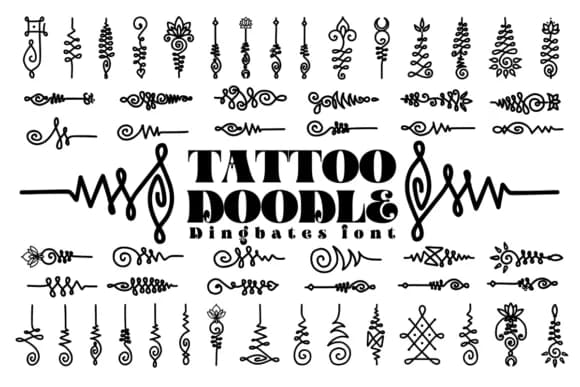
Tattoo Doodle replaces traditional letterforms with hand-drawn graphic symbols that capture classic American tattoo culture. Designed by Chonada, this dingbat collection channels the bold, inky aesthetic of vintage parlor work, giving your designs instant retro credibility. The character set includes flames, skulls, ribbons, stars, and decorative flourishes, each rendered with the loose, confident line weight of traditional ink-on-skin design. There's genuine character baked into every glyph.
Where this font truly excels is on projects that demand attitude and authenticity. Retro band album artwork, vintage beer label designs, old-school tattoo parlor signage, and classic motorcycle club posters all work beautifully with this collection. The hand-drawn quality makes layouts feel personal and grounded rather than polished or corporate. You can layer these symbols across fabric print designs, scatter them into merch mockups, or use them as decorative anchors on speakeasy menus and vintage diner graphics. The result is visual texture and depth without relying on photography.
Rockabilly wedding suites, biker-bar promotional materials, and indie record store branding all benefit from this font's authentic old-school energy. Need vintage flair with real character? Grab Tattoo Doodle from Creative Fabrica and start building.
Style & Use Cases
- Overall Style
- Iconographic, Doodle
- Use Case
- Icons, Accents
- Ideal For
- ornaments, bullets, and decorative flourishes
- Pairs With
- any text font
How to Install Tattoo Doodle Font
Step-by-step instructions for every platform
- 1Download the Tattoo Doodle font file (.ttf or .otf).
- 2Locate the downloaded file in your Downloads folder.
- 3Right-click the font file.
- 4Select "Install" to install for the current user, or "Install for all users" to make it available system-wide.
- 5Tattoo Doodle is now available in Word, Photoshop, Illustrator, and all other apps.




Browse fonts by theme
Curated collections →Saw a font in a picture? Identify any font from an image with our free Font Finder.
More Dingbats Fonts
Browse all →







What pairs well with Tattoo Doodle Font?
Tattoo Doodle Font is a versatile dingbats font that works for both headings and body text. Pair it with a contrasting sans-serif or serif font to add visual interest and a clear distinction between titles and body copy.



Tattoo Doodle Font
by Chonada
Reviewed by the FontBoxDL team · Updated July 2026