 Firefox
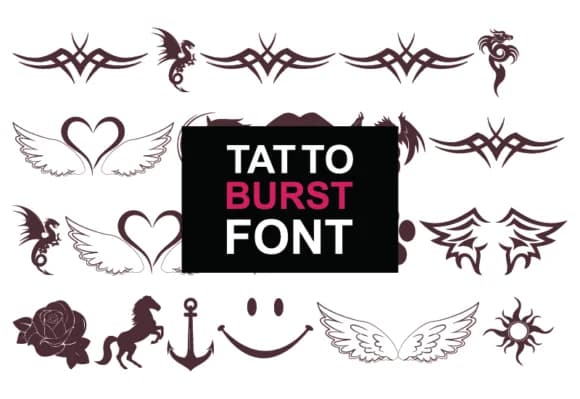 1 / 7
1 / 7Loading font…
About Tatto Burst Font
Picture a tattoo artist sketching flash sheets or a designer hunting for symbols with real character and depth. Tatto Burst, created by GraphicsNinja, delivers exactly that: a dingbat font built around 36 intricate tattoo-inspired designs drawn from ancient mythology, Asian art traditions, and mystical iconography. The collection spans dragons, protective runes, spiritual sigils, and ornamental creatures that function as genuine decorative elements rather than arbitrary filler. Each character is fully scalable, so you can work at 12 points or scale to 200 without losing detail.
This font excels for tattoo shop social media graphics, alternative product packaging and branding, band merchandise design, and occult-themed book cover accents. Drop a single symbol onto a t-shirt mockup or build entire compositions by layering multiple characters from the full set. The range supports both darker, edgier aesthetics and refined symbolic illustration depending on your project's needs. A metaphysical brand, a studio flash sheet, a boutique book cover, or gaming merchandise all benefit from this level of visual specificity and cultural resonance. The designs read as intentional choices rather than borrowed from a generic clip art library.
Getting started is straightforward: download Tatto Burst from Creative Fabrica and begin building designs that feel distinctly yours.
Style & Use Cases
- Overall Style
- Iconographic, Ancient
- Use Case
- Icons, Accents
- Ideal For
- ornaments, bullets, and decorative flourishes
- Pairs With
- any text font
How to Install Tatto Burst Font
Step-by-step instructions for every platform
- 1Download the Tatto Burst font file (.ttf or .otf).
- 2Locate the downloaded file in your Downloads folder.
- 3Right-click the font file.
- 4Select "Install" to install for the current user, or "Install for all users" to make it available system-wide.
- 5Tatto Burst is now available in Word, Photoshop, Illustrator, and all other apps.
More by GraphicsNinja
View all →
Browse fonts by theme
Curated collections →Saw a font in a picture? Identify any font from an image with our free Font Finder.
More Dingbats Fonts
Browse all →







What pairs well with Tatto Burst Font?
Tatto Burst Font is a versatile dingbats font that works for both headings and body text. Pair it with a contrasting sans-serif or serif font to add visual interest and a clear distinction between titles and body copy.



Tatto Burst Font
Reviewed by the FontBoxDL team · Updated October 2026