 Firefox
 1 / 8
1 / 8About Sweets Doodle Font
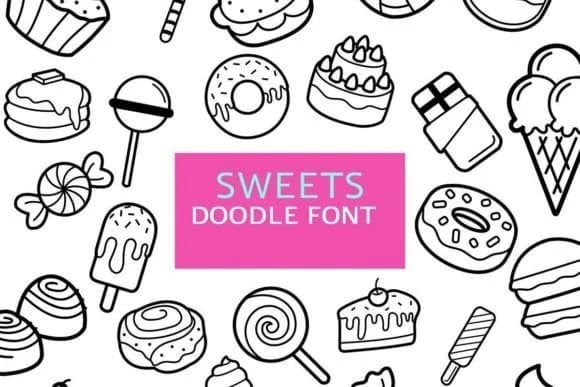
This dingbat set brings instant playfulness to any creative project. Sweets Doodle, designed by digitalplannerland, is a collection of delightful character symbols shaped like candy, swirls, and cute motifs that work beautifully as both decorative elements and standalone illustrations throughout your layouts.
The font shines when you're building digital planner spreads with themed section dividers, embellishing recipe cards and cooking websites with hand-drawn charm, or layering ornamental breaks through scrapbooking layouts. Bullet journal setups become more visually interesting with these symbols anchoring sections, separating dated entries, or marking important tasks with personality. Wedding invitation suites benefit from subtle ornamental touches, while sticker sheet designers will appreciate having a complete, coordinated set of dingbat characters to work with. Activity book illustrations, greeting card embellishments, and journaling page accents all coordinate naturally with these forms. Multiple formats are included (OTF and TTF files), which means you can use these symbols in your design software, export them as graphics for digital projects, or integrate them across web-based planners and templates.
Pair this playful dingbat collection with a clean, minimal sans-serif for any accompanying text, and you'll create a balanced visual system that lets the whimsy shine without overwhelming the page. Find Sweets Doodle on Creative Fabrica and start adding character to your next creative venture.
Style & Use Cases
- Overall Style
- Iconographic, Doodle
- Use Case
- Icons, Accents
- Ideal For
- ornaments, bullets, and decorative flourishes
- Pairs With
- any text font
How to Install Sweets Doodle Font
Step-by-step instructions for every platform
- 1Download the Sweets Doodle font file (.ttf or .otf).
- 2Locate the downloaded file in your Downloads folder.
- 3Right-click the font file.
- 4Select "Install" to install for the current user, or "Install for all users" to make it available system-wide.
- 5Sweets Doodle is now available in Word, Photoshop, Illustrator, and all other apps.
More by digitalplannerland
View all →
Browse fonts by theme
Curated collections →Saw a font in a picture? Identify any font from an image with our free Font Finder.
More Dingbats Fonts
Browse all →







What pairs well with Sweets Doodle Font?
Sweets Doodle Font is a versatile dingbats font that works for both headings and body text. Pair it with a contrasting sans-serif or serif font to add visual interest and a clear distinction between titles and body copy.



Sweets Doodle Font
Reviewed by the FontBoxDL team · Updated June 2026