
 1 / 8
1 / 8About Sweet Chocolate Font
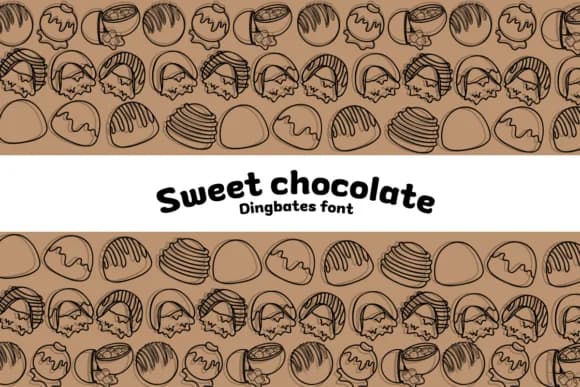
You're designing a chocolate shop's branding, and you realize you need visuals that do the talking instead of fussy typography. Sweet Chocolate, created by Chonada, is a dingbat font that swaps regular characters for a full menu of chocolate illustrations: truffles, candy bars, cocoa pods, and hand-drawn desserts that actually look like something worth savoring. The cartoon style reads as charming rather than kitschy, which matters when you're applying it to real products.
This font lands on bakery menu cards, chocolate box packaging, and the kind of artisan labels that make customers pause. Cafe owners layer it into table tents above dessert displays. Wedding planners use it for signage at chocolate-themed favor stations. On Etsy, sellers creating small-batch chocolate labels find it cuts through the noise of generic decorative fonts. The consistency of the illustration style across all glyphs means everything looks intentional, not assembled from a dozen sources.
Try it large on a poster or small on sticker labels; the symbols stay sharp and readable either way. Grab Sweet Chocolate from Creative Fabrica and let the imagery carry your chocolate story.
Style & Use Cases
- Overall Style
- Iconographic, Chocolate
- Use Case
- Icons, Accents
- Ideal For
- ornaments, bullets, and decorative flourishes
- Pairs With
- any text font
How to Install Sweet Chocolate Font
Step-by-step instructions for every platform
- 1Download the Sweet Chocolate font file (.ttf or .otf).
- 2Locate the downloaded file in your Downloads folder.
- 3Right-click the font file.
- 4Select "Install" to install for the current user, or "Install for all users" to make it available system-wide.
- 5Sweet Chocolate is now available in Word, Photoshop, Illustrator, and all other apps.




Browse fonts by theme
Curated collections →Saw a font in a picture? Identify any font from an image with our free Font Finder.
More Dingbats Fonts
Browse all →







What pairs well with Sweet Chocolate Font?
Sweet Chocolate Font is a versatile dingbats font that works for both headings and body text. Pair it with a contrasting sans-serif or serif font to add visual interest and a clear distinction between titles and body copy.



Sweet Chocolate Font
by Chonada
Reviewed by the FontBoxDL team · Updated July 2026