 Firefox
 1 / 8
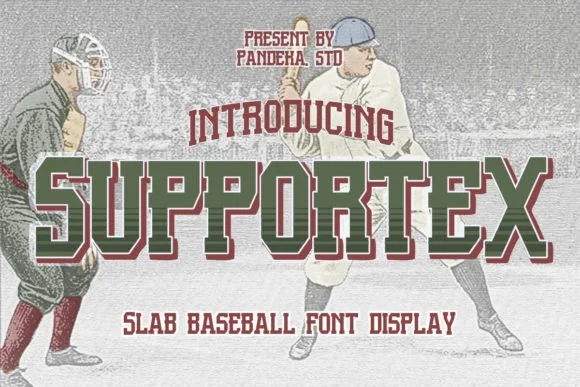
1 / 8About Supportex Font
Built for impact and unmissable presence, Supportex is a slab serif display face from pandekastudio that swings with vintage American athletic swagger. The typeface channels raw energy through chunky, deliberately weighted letterforms that command attention in any context where you land them.
You'll find this working on sports team logos and jerseys, vintage racing event posters, boxing gym signage, retro merchandise labels, and any project where you need confident visual weight. The design captures that golden-age feeling of classic athleticism without tipping into pure nostalgia. Six style variations (Regular, Outline, Italic, Slash, Italic Outline, and Italic Slash) let you layer the texture and adjust the visual punch, while OpenType alternates give you swappable characters to fine-tune the exact personality you're after. The letterforms sit somewhere between retro Americana and contemporary strength, which is exactly why this face travels across so many sports and lifestyle contexts. That flexibility matters: you can build a sleek emblem with one configuration or push toward bold proclamation with another.
Pair Supportex with a clean, neutral sans-serif for secondary text and supporting copy, keeping legibility in check while the slab serif takes the spotlight. Grab it on Creative Fabrica to add this heavyweight to your toolkit.
Style & Use Cases
- Overall Style
- Sturdy, Confident, Baseball
- Use Case
- Headlines, Merch
- Ideal For
- vintage posters, logos, and product packaging
- Pairs With
- a light sans-serif
How to Install Supportex Font
Step-by-step instructions for every platform
- 1Download the Supportex font file (.ttf or .otf).
- 2Locate the downloaded file in your Downloads folder.
- 3Right-click the font file.
- 4Select "Install" to install for the current user, or "Install for all users" to make it available system-wide.
- 5Supportex is now available in Word, Photoshop, Illustrator, and all other apps.
More by pandekastudio
View all →
Browse fonts by theme
Curated collections →Saw a font in a picture? Identify any font from an image with our free Font Finder.
More Slab Serif Fonts
Browse all →







What pairs well with Supportex Font?
Supportex Font is a slab serif font that shines as a display or heading face. Pair it with a clean sans-serif or serif font for body text — the contrast creates a clear hierarchy while the two styles stay balanced and easy to read.




Supportex Font
Reviewed by the FontBoxDL team · Updated August 2026