 Firefox
 1 / 7
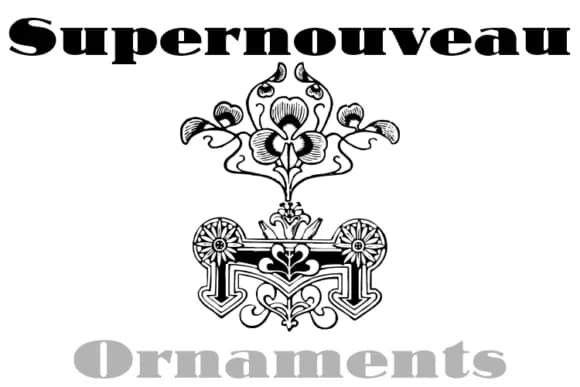
1 / 7About Supernouveau Font
You're laying out a vintage wedding invitation suite, and you need decorative flourishes that read as timeless rather than trendy or overly modern. That's where Supernouveau from Intellecta Design steps in. This dingbats font contains 244 art nouveau ornaments and decorative pieces, each one evoking early-1900s elegance without feeling dated, overwrought, or clichéd. The ornaments capture that delicate, architectural quality of the period, with curves and flourishes that suggest craft.
The real strength of Supernouveau is how it handles specific, real-world work. You can mix and match these elements for wedding invitation borders and corner details, apply them to boutique skincare packaging to signal craftsmanship and heritage, layer them into DIY decor signs that need visual weight and sophistication, or use them on Etsy product labels where that ornamental polish genuinely sets you apart from mass-produced competition. Because these are dingbats rather than letters, you get the freedom to use single pieces, clusters, or full ornamental frames depending on what your project demands.
Plenty of variation in this collection means you're not limited to just a few decorative patterns. Pick it up from Creative Fabrica and you'll have what you need to build designs that genuinely feel composed and intentional.
Style & Use Cases
- Overall Style
- Iconographic, Art Nouveau
- Use Case
- Icons, Accents
- Ideal For
- ornaments, bullets, and decorative flourishes
- Pairs With
- any text font
How to Install Supernouveau Font
Step-by-step instructions for every platform
- 1Download the Supernouveau font file (.ttf or .otf).
- 2Locate the downloaded file in your Downloads folder.
- 3Right-click the font file.
- 4Select "Install" to install for the current user, or "Install for all users" to make it available system-wide.
- 5Supernouveau is now available in Word, Photoshop, Illustrator, and all other apps.
More by Intellecta Design
View all →
Browse fonts by theme
Curated collections →Saw a font in a picture? Identify any font from an image with our free Font Finder.
More Dingbats Fonts
Browse all →







What pairs well with Supernouveau Font?
Supernouveau Font is a versatile dingbats font that works for both headings and body text. Pair it with a contrasting sans-serif or serif font to add visual interest and a clear distinction between titles and body copy.



Supernouveau Font
Reviewed by the FontBoxDL team · Updated June 2026