 Firefox
 1 / 8
1 / 8About Strips & Spots Font
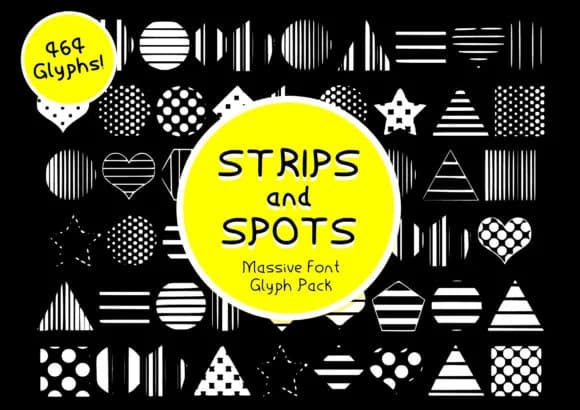
This font radiates playfulness and expressive energy from the moment you open it. Strips & Spots, designed by GraphicsBam Fonts, is a dingbats collection that brings real decorative impact to any project that needs visual personality and movement.
The font packs 464 unique glyphs ranging from geometric patterns to mixed textures, giving you substantial flexibility when layering and building compositions. Use them for greeting card embellishments that stand out from cookie-cutter templates, sticker sheet designs for print-on-demand shops where buyers expect visual variety, or digital planner elements that feel thoughtfully crafted rather than generic stock. Scrapbooking layouts come alive when you layer these marks across cardstock, and they're equally powerful for creating web graphics that escape the standard illustration library look. The individual glyphs combine beautifully to form cohesive repeating patterns or work as intelligent punctuation between other typefaces without drowning out the page.
This collection pairs beautifully with a neutral, clean sans-serif for any body text, keeping the visual weight balanced and letting the dingbats shine without competition. Head to Creative Fabrica to download and start building with these versatile marks.
Style & Use Cases
- Overall Style
- Iconographic, Pack
- Use Case
- Icons, Accents
- Ideal For
- ornaments, bullets, and decorative flourishes
- Pairs With
- any text font
How to Install Strips & Spots Font
Step-by-step instructions for every platform
- 1Download the Strips & Spots font file (.ttf or .otf).
- 2Locate the downloaded file in your Downloads folder.
- 3Right-click the font file.
- 4Select "Install" to install for the current user, or "Install for all users" to make it available system-wide.
- 5Strips & Spots is now available in Word, Photoshop, Illustrator, and all other apps.
More by GraphicsBam Fonts
View all →

Browse fonts by theme
Curated collections →Saw a font in a picture? Identify any font from an image with our free Font Finder.
More Dingbats Fonts
Browse all →







What pairs well with Strips & Spots Font?
Strips & Spots Font is a versatile dingbats font that works for both headings and body text. Pair it with a contrasting sans-serif or serif font to add visual interest and a clear distinction between titles and body copy.



Strips & Spots Font
Reviewed by the FontBoxDL team · Updated July 2026