 Firefox
 1 / 8
1 / 8About Stories Typewrite Font
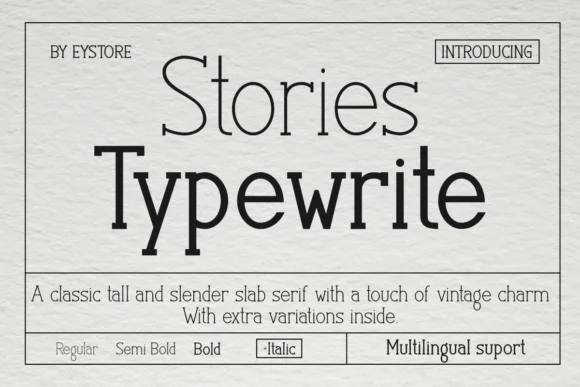
Picture a vintage printing press rolling out pages for a literary journal, or a designer hunched over setting type for a leather-bound journal cover. Stories Typewrite, created by Eystore, is a tall, slender slab serif that captures that classic typewriter aesthetic without feeling dated or trapped in pure nostalgia.
The typeface draws directly from old mechanical typewriters but refines the concept into something much cleaner and more refined than its inspiration. You'll find it working well on vintage cookbook dust jackets, mastheads for literary magazines, small-batch apothecary product labels, and vintage film posters where both readability and visual character matter equally. The family ships with Regular, Semi Bold, Bold, and Italic weights, giving you the flexibility to layer emphasis and build visual hierarchy across a single project without hunting for a second typeface. Multilingual support expands what you can work on, beyond just English language publications.
When you push the letterforms large for book covers or posters, those slim proportions command genuine presence on the page without losing their delicate personality. Get Stories Typewrite on Creative Fabrica and add it to your working collection.
Style & Use Cases
- Overall Style
- Sturdy, Confident, Nostalgic Font
- Use Case
- Headlines, Merch
- Ideal For
- vintage posters, logos, and product packaging
- Pairs With
- a light sans-serif
How to Install Stories Typewrite Font
Step-by-step instructions for every platform
- 1Download the Stories Typewrite font file (.ttf or .otf).
- 2Locate the downloaded file in your Downloads folder.
- 3Right-click the font file.
- 4Select "Install" to install for the current user, or "Install for all users" to make it available system-wide.
- 5Stories Typewrite is now available in Word, Photoshop, Illustrator, and all other apps.
More by Eystore
View all →
Browse fonts by theme
Curated collections →Saw a font in a picture? Identify any font from an image with our free Font Finder.
More Slab Serif Fonts
Browse all →







What pairs well with Stories Typewrite Font?
Stories Typewrite Font is a slab serif font that shines as a display or heading face. Pair it with a clean sans-serif or serif font for body text — the contrast creates a clear hierarchy while the two styles stay balanced and easy to read.




Stories Typewrite Font
by Eystore
Reviewed by the FontBoxDL team · Updated September 2026