 Firefox
 1 / 8
1 / 8About Stickies Christmas Dingbats Font
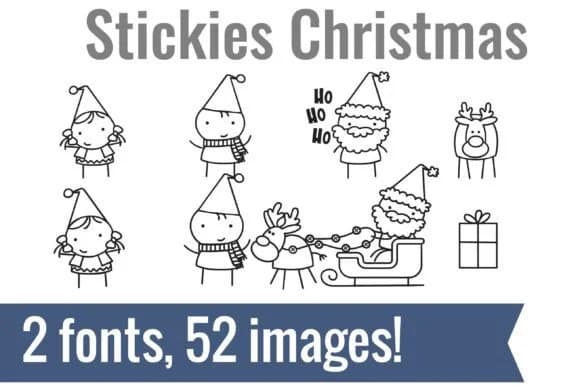
Imagine you're putting together vinyl-cut ornaments for a holiday craft fair, and you need cute, consistent graphics that feel hand-drawn rather than perfectly polished. Stickies Christmas Dingbats from Illustration Ink gives you exactly that: 52 quirky glyphs in a genuinely sketchy style that looks like it came straight from a designer's notebook.
The collection includes elf characters, a scribbled Santa in his sleigh, reindeer, gift boxes, and even "HO HO HO" spelled out in the same loose line work. You type a letter on your keyboard and get a complete image instead of hunting through clip art libraries or opening separate graphic files. This is especially useful with cutting software like Cricut, and gives you consistent icons for teacher appreciation tags, classroom bulletin board displays, and holiday greeting suites.
The loose, sketchy style is by design. It keeps these from feeling sterile or overpolished, making them work well for kids' activity sheets, gift tags, and planner stickers where that approachable hand-drawn feel matters. Vector-based fonts mean these scale smoothly from large cuts to small prints without losing quality. Grab it from Creative Fabrica and you'll have a library ready to use immediately.
Style & Use Cases
- Overall Style
- Iconographic, Christmas Font
- Use Case
- Icons, Accents
- Ideal For
- ornaments, bullets, and decorative flourishes
- Pairs With
- any text font
How to Install Stickies Christmas Dingbats Font
Step-by-step instructions for every platform
- 1Download the Stickies Christmas Dingbats font file (.ttf or .otf).
- 2Locate the downloaded file in your Downloads folder.
- 3Right-click the font file.
- 4Select "Install" to install for the current user, or "Install for all users" to make it available system-wide.
- 5Stickies Christmas Dingbats is now available in Word, Photoshop, Illustrator, and all other apps.
More by Illustration Ink
View all →



Browse fonts by theme
Curated collections →Saw a font in a picture? Identify any font from an image with our free Font Finder.
More Dingbats Fonts
Browse all →







What pairs well with Stickies Christmas Dingbats Font?
Stickies Christmas Dingbats Font is a versatile dingbats font that works for both headings and body text. Pair it with a contrasting sans-serif or serif font to add visual interest and a clear distinction between titles and body copy.



Stickies Christmas Dingbats Font
Reviewed by the FontBoxDL team · Updated June 2026